
Branded vs. Unbranded Keywords: Why They Differ
Branded keywords contain your company or product name and signal that someone already knows you exist. Unbranded keywords contain no brand reference and are how most people discover you for the first time. The single most important action you can take right now: separate them in every campaign and every report you run. Mixing the two inflates your SEO metrics, distorts your PPC budgets, and makes it nearly impossible to know what is actually working. A balanced strategy uses branded terms to defend and convert while unbranded terms widen reach and build long-term authority.
Quick actions to take this week:
- Segregate campaigns: Run brand and non-brand as separate PPC campaigns with distinct budgets and ad copy.
- Split your reporting: Filter branded queries out of your organic performance reports in both your analytics and search performance tools to avoid credit inflation.
- Set realistic KPIs: Branded queries will show higher conversion rates and lower CPCs; unbranded queries will show higher volume and lower conversion rates. Treat them as separate KPIs.
- Bid defensively on brand: Unless you have a specific reason not to, bid on your own brand terms in paid search to prevent competitors from capturing that demand.
- Scale unbranded content: If you rely mostly on branded traffic today, your growth ceiling is low. Unbranded content is the engine for discovery and authority.
Ranksector can help you scale the unbranded content side of this equation without adding headcount, but more on that later.
Key Takeaways
Branded keywords convert at higher intent; unbranded keywords drive discovery and scale, and treating them as separate channels in both campaigns and reporting is the single most important operational decision you can make.
| Point | Details |
|---|---|
| Separate campaigns and reports | Run brand and non-brand as distinct PPC campaigns and filter them separately in Search Console and GA4. |
| Avoid credit inflation | Rolling branded and non-branded traffic together overstates SEO impact; always split before reporting to stakeholders. |
| Match content to intent | Branded queries need conversion-focused pages; unbranded queries need educational, topical content that earns trust first. |
| Test before cutting brand bids | Run a two-week geographic or time-based test to measure whether paid brand ads are incremental or cannibalizing organic. |
| Ranksector for non-brand scale | Ranksector automates daily publication of unbranded SEO content, closing the gap between keyword strategy and live articles. |
Table of Contents
- Why branded vs. unbranded keywords differ at the definition level
- How user intent and funnel stage differ between the two keyword types
- Organic search strategy: what content to build for each keyword type
- Paid search tactics: how to structure campaigns for brand and non-brand
- How to measure brand vs. non-brand performance without inflating results
- Does paid brand bidding cannibalize your organic traffic?
- Your one-week playbook for separating and acting on branded vs. non-brand data
- The trade-off most marketers get wrong
- Ranksector cuts the time between strategy and published content
- Sources
Why branded vs. unbranded keywords differ at the definition level
The cleanest way to classify a query: if it contains your company name, a product name, a trademarked SKU, or a predictable misspelling of any of those, it is branded. If it contains none of those, it is unbranded. Branded queries typically indicate higher intent and are easier to convert because the searcher already has awareness of who you are.
Branded query examples:
- “Ranksector pricing”
- “Salesforce CRM login”
- “HubSpot free trial”
- “Adobe Photoshop download”
- “Slack vs Teams” (contains a brand name, so it is branded for Slack)
Unbranded query examples:
- “SEO content automation tool”
- “how to rank a SaaS blog”
- “best CRM for small business”
- “project management software comparison”
- “email marketing platform pricing”
Edge cases worth knowing:
- Generic product names: “Zoom” is a brand, but “video conferencing” is not. If your brand name has become a generic verb (think “Google it”), you still treat the brand-name form as branded.
- Model numbers and SKUs: A product model number unique to your catalog behaves like a branded query even if it contains no company name.
- Ambiguous brand names: If your brand name is also a common word (e.g., “Apple,” “Square”), use context signals. A query like “apple cider vinegar” is clearly unbranded; “Apple MacBook” is clearly branded.
For automated classification, a simple regex pattern like \b(yourbrand|yourbrandname|yourproduct|yourproduct\s?pro)\b applied case-insensitively covers most cases. Build your exclusion list iteratively as you find edge cases in your Search Console data.
How user intent and funnel stage differ between the two keyword types
Branded and unbranded queries sit at opposite ends of the funnel, and that gap shapes everything from your landing page design to your conversion rate expectations.
-
Branded queries are navigational or transactional. The searcher knows you. They want your login page, your pricing, your support docs, or they are ready to buy. These queries sit at the Decision stage of the funnel, and they convert at a higher rate because intent is already resolved.
-
Unbranded queries are informational or consideration-stage. The searcher has a problem or a category question and has not yet decided on a vendor. These sit at the Awareness and Consideration stages. They drive discovery, not direct conversion, and that is their job. Expecting unbranded traffic to convert at the same rate as branded traffic is a measurement mistake, not a content failure.
-
CTR patterns differ sharply. Branded queries in organic search tend to produce very high click-through rates because your homepage or brand page is the obvious destination. Unbranded queries in organic search produce lower CTRs because the SERP is more competitive and the searcher is still evaluating options.
-
CPC profiles are different. Branded queries often carry lower CPCs in paid search because Quality Scores are typically high when your ad, keyword, and landing page all reference your own brand. Unbranded queries in PPC carry higher CPCs and require more competitive bidding.
-
Landing page requirements diverge. A branded query landing page should confirm identity, reduce friction, and move the user to the next step (sign up, log in, contact). An unbranded query landing page needs to educate first, establish relevance, and earn the click to a deeper page. Sending unbranded traffic to a homepage built for branded intent is one of the most common conversion leaks in SaaS.
Understanding why keyword intent matters in this context is what separates a well-structured campaign from one that wastes budget on the wrong message at the wrong moment.
Organic search strategy: what content to build for each keyword type
The content you build for branded queries and the content you build for unbranded queries serve completely different purposes. Mixing them up wastes both effort and crawl budget.
For branded queries, prioritize:
- A well-optimized homepage and brand landing page with a clear H1 that matches your brand name and primary value proposition.
- Product and feature pages with canonical URLs, structured data, and internal links from your blog.
- A help center or knowledge base that captures support-intent branded queries (“how to use [product] for X”).
- Review and comparison pages that intercept branded queries with social proof.
For unbranded queries, the content engine looks different:
- Topical hubs organized around the problems your product solves (e.g., “SEO for SaaS,” “content marketing automation”).
- Long-form guides and how-to articles targeting informational queries at the top of the funnel.
- Comparison and “best of” pages targeting consideration-stage queries (“best SEO tools for small teams”).
- Use-case pages that connect a specific unbranded problem to your product’s solution.
Internal linking is where the two strategies connect. Route your unbranded topical pages into your product and brand pages through contextual links. A guide on “how to automate blog publishing” should link to your product page. A comparison article should link to your pricing page. This is how you capture downstream conversions from top-of-funnel unbranded traffic without forcing the conversion prematurely.
On timing: branded rankings respond quickly to on-page changes because you own the brand signal. Unbranded content takes longer, typically three to six months before meaningful organic traction, because you are building topical authority from scratch. Ranking for unbranded queries requires consistent topical content and broader on-site signals. Plan your roadmap accordingly, and do not judge unbranded content by 30-day metrics.
For teams looking to identify gaps in their unbranded coverage, a keyword gap analysis is the fastest way to find where competitors are ranking and you are not.
Paid search tactics: how to structure campaigns for brand and non-brand
The most common PPC mistake is running brand and non-brand keywords in the same campaign. When you do that, your brand terms inflate Quality Scores, your budget allocation becomes opaque, and your reporting tells you nothing useful. Run separate campaigns with distinct budgets and ad copy from day one.
Recommended campaign architecture:
-
Brand Defense Campaign: Exact and phrase match on your brand name and close variants. Goal: prevent competitors from capturing your branded demand. Budget: smaller but non-negotiable. Ad copy: reinforce your brand, highlight differentiators, and link to a high-converting landing page.
-
Non-Brand Acquisition Campaign: Broad match modified or phrase match on category and problem-based keywords. Goal: drive new-audience discovery. Budget: largest allocation. Ad copy: lead with the problem, not your brand name.
-
Competitor Campaign (optional): Phrase match on competitor brand names where permitted. Goal: capture consideration-stage searchers evaluating alternatives. Budget: test-and-learn allocation. Keep this separate from both brand and non-brand campaigns.
Dos and don’ts:
- Add your brand terms as negative keywords in your non-brand campaigns. This prevents cross-campaign bleed where a branded query triggers a non-brand ad and wastes budget.
- Add non-brand category terms as negative keywords in your brand campaign to keep it focused.
- Use exact match for brand terms. Broad match on brand keywords invites irrelevant queries and inflated spend.
- Monitor Auction Insights regularly to see which competitors are bidding on your brand terms. That data tells you how aggressively to defend.
Pro Tip: Before committing permanent budget to brand bidding, run a simple A/B test: pause brand ads for two weeks in one geo or device segment while keeping them live in a matched control. Compare organic branded clicks and total branded conversions across both periods. If organic picks up the volume without a conversion drop, your brand campaign may be cannibalizing organic rather than adding incremental value.
Understanding when SEO outperforms PPC long-term is useful context for deciding how much of your brand defense budget to shift toward organic over time.
How to measure brand vs. non-brand performance without inflating results
Rolling branded and non-branded traffic together in a single report is one of the most common ways digital marketers overstate the impact of their SEO work. Failing to split these segments creates credit inflation: your content team looks like it is driving growth when the real driver is a TV campaign or a PR mention that spiked branded search.
Reporting setup checklist:
- Google Search Console: Apply a query filter excluding your brand name regex (
yourbrand|yourbrandname) to see pure non-brand organic performance. Save this as a named filter you reuse every reporting cycle. - GA4 custom channel groups: Create two channel definitions: one for branded organic sessions and one for non-branded organic sessions. This gives you separate conversion data for each.
- Campaign naming tokens: Use consistent prefixes like
BRAND_andNB_in every campaign name. This makes GA4 segments and SQL queries reliable without manual tagging. - Segment your Search Console data: Export queries, apply your brand regex, and track non-brand impressions, clicks, and average position separately from branded metrics week over week.
- Attribution model awareness: Last-click attribution heavily favors branded terms because users often return via a branded search right before converting. Switch to data-driven attribution in GA4 to distribute credit more accurately across the funnel. Even then, present branded and non-branded conversion data side by side in stakeholder reports so the distinction is visible.
Sample GA4 regex for non-brand organic segment:
Session source/medium exactly matches "google / organic"
AND Landing page does not match regex: yourbrand|yourbrandname|yourproduct
A practical cadence: review non-brand organic weekly for ranking movement, monthly for conversion trends, and quarterly for topical coverage gaps. Branded metrics move more slowly and can be reviewed monthly unless a competitor bidding spike or PR event warrants a closer look. Tools like Gainable can help you convert this campaign data into structured marketing actions and dashboards.
Does paid brand bidding cannibalize your organic traffic?
Paid brand bids can shift click behavior on branded SERPs. When your paid ad appears above your organic result, some users click the ad instead of the organic listing. Whether that represents true incrementality or pure cannibalization depends on your specific situation, and you should test before making permanent budget decisions.
Simple cannibalization test plan:
- Define your control and treatment. Control: brand ads running as normal. Treatment: brand ads paused. Use a geographic split (two similar-sized markets) or a time-based split (two consecutive two-week periods with stable external conditions).
- Set your measurement window. Two weeks minimum per period. Shorter windows introduce too much noise from day-of-week variation.
- Identify the metrics to track. Organic branded sessions, organic branded conversions, paid branded clicks, total branded conversions (paid + organic combined), and assisted conversions from branded touchpoints.
- Run the test and hold conditions stable. Do not launch new campaigns, PR pushes, or major site changes during the test window.
- Interpret results using this framework:
| Outcome | What it means | Next action |
|---|---|---|
| Organic clicks rise when ads pause; total conversions hold | High cannibalization | Reduce or pause brand bids; let organic carry branded demand |
| Organic clicks rise when ads pause; total conversions drop | Partial incrementality | Lower brand bids; keep a defensive floor |
| Organic clicks unchanged when ads pause; total conversions drop | True incrementality | Keep brand campaign; budget is justified |
| Organic clicks unchanged; total conversions unchanged | Low brand search volume | Deprioritize brand campaign; reallocate budget |
For ongoing tracking of branded ranking movement during and after the test, keyword position tracking gives you the granularity to detect shifts quickly.
Your one-week playbook for separating and acting on branded vs. non-brand data
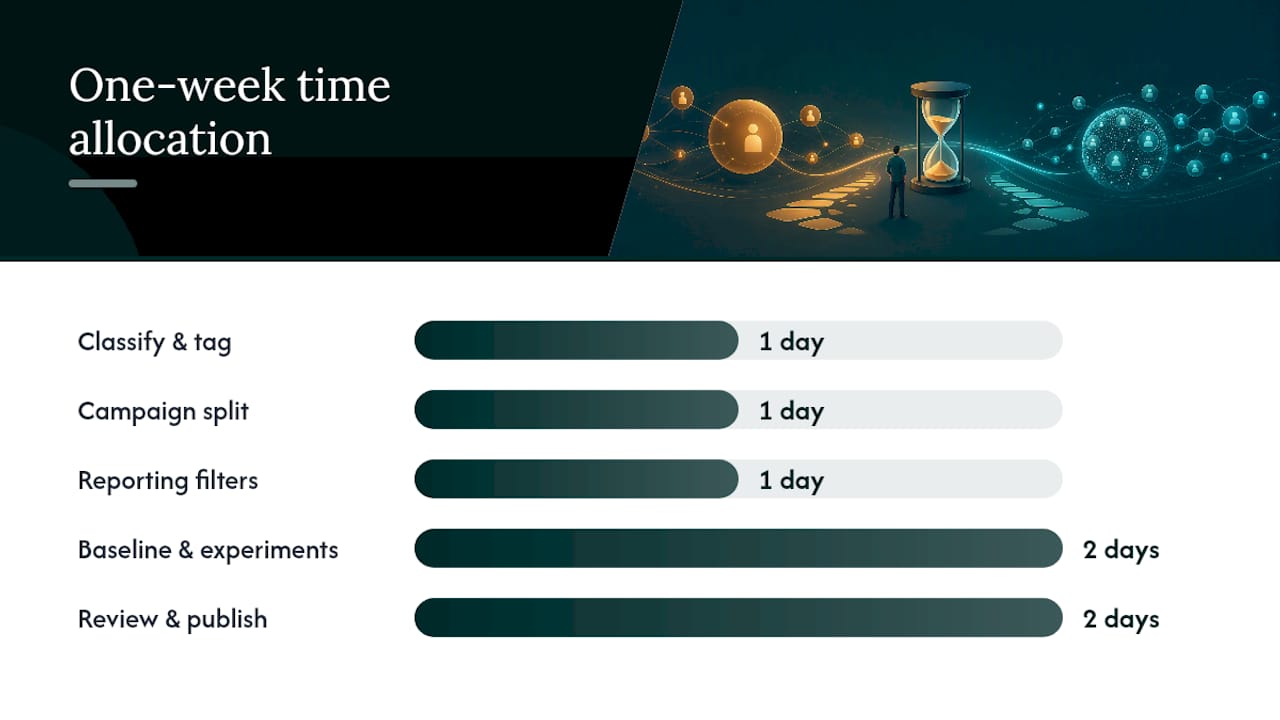
This is the implementation sequence that turns strategy into tasks. Assign ownership before you start.
Day 1: Classify and tag
- Pull your top 200 queries from your organic search performance data for the last 90 days.
- Apply your brand regex and label each query as
BRANDorNBin a spreadsheet. - Flag edge cases (model numbers, ambiguous terms) for manual review.
- Document your classification rules in a shared team doc so the logic is repeatable.
Day 2: Campaign split
- Duplicate your current search campaigns into
BRAND_andNB_versions. - Add brand terms as negatives in the
NB_campaign; add non-brand category terms as negatives in theBRAND_campaign. - Set separate budgets and assign separate conversion goals to each.
Day 3: Reporting filters
- Set up your Search Console brand-exclusion filter and save it.
- Create custom channel groups in your analytics tool for Organic Brand and Organic Non-Brand.
- Build a simple dashboard with four metrics side by side: branded clicks, non-branded clicks, branded conversions, non-branded conversions.
Day 4–5: Baseline and quick experiments
- Record your baseline metrics for both segments before any changes take effect.
- If you have not run a cannibalization test, set up the geographic or time-based split now.
- Use competitor keyword gap data to identify the top five unbranded queries where you have no content yet.
Day 6–7: Review and publish findings
- Compile a one-page stakeholder brief: current brand vs. non-brand split, top opportunities, and the test plan timeline.
- Naming convention to lock in:
[BRAND/NB]_[Channel]_[Geo]_[Objective](e.g.,BRAND_Search_US_Defense,NB_Search_US_Acquisition). - Governance: the PPC owner manages campaign splits; the SEO owner manages content classification and Search Console filters; both report into a shared dashboard reviewed weekly.
Governance checklist:
- ✅ Brand regex documented and version-controlled
- ✅ Campaign naming convention applied across all active campaigns
- ✅ GA4 channel groups live and validated against raw data
- ✅ Cannibalization test scheduled with defined start and end dates
- ✅ Stakeholder report template built and shared
Search visibility tracking at the branded vs. non-branded level gives you the longitudinal view to show progress over quarters, not just weeks.
The trade-off most marketers get wrong
Most teams I work with through Ranksector make the same mistake: they treat branded traffic as proof that SEO is working. It is not. Branded traffic is proof that your brand exists in the market. It is a lagging indicator of awareness built through product, sales, and offline marketing. Crediting your content team for branded organic growth is like crediting your chef for the restaurant’s reputation.
The real SEO signal is non-branded organic growth. That is where content strategy, topical authority, and keyword targeting actually show up in the data. Overreliance on branded traffic limits long-term authority, and the teams that figure this out earliest tend to build the most durable search presence.
The trade-off is real, though. A SaaS company in a crowded category might spend a majority of its content budget on unbranded acquisition content and still see flat non-brand traffic for several months while competitors with more domain authority outrank them on every target query. The answer is not to abandon the strategy. It is to pair unbranded content production with a backlink and authority-building program so the content has the domain signals to rank. Higher-education institutions face a version of this same trade-off: branded terms protect institutional presence while non-branded terms expand enrollment reach, and the budget allocation between the two shifts depending on enrollment cycle timing.
Where I typically prioritize: non-branded content first, brand defense second, competitor targeting third. Brand defense is cheap and high-ROI once you have it set up. Non-branded content is the long game, and the teams that start it later always wish they had started it sooner.
Ranksector cuts the time between strategy and published content
The hardest part of a non-branded content strategy is not the planning. It is the publishing cadence. Most teams identify 50 unbranded keyword opportunities and publish three articles. The gap between what you know you should do and what actually gets done is almost always a production bottleneck.
Ranksector solves that specific problem. It automates the creation and daily publication of SEO-optimized long-form articles, built around the unbranded keyword opportunities your competitors are already ranking for. You get competitive keyword research, direct CMS publishing, and a contextual backlink exchange network to grow domain authority, all without adding writers or agency retainers.
For teams that need to close the gap between their keyword plan and their published content library fast, the Ranksector agency product is built for exactly that scale. If you want to start with a content gap audit before committing, the AI audit tool gives you a prioritized list of unbranded opportunities in minutes.
Sources
- Branded vs Non-Branded Traffic: What’s More Important for SEO?
- Branded Search vs. Non-Branded Search: What’s the Difference?
- Branded vs. Non-Branded Keywords: What They Are + How to Use Them
- Branded vs. Non-Branded Keywords: What’s the Difference?
- Harness Non-Branded Traffic for Sustainable Growth - Moz
- Branded vs. Non-Branded Keywords for Higher Ed Sites
Recommended
- Types of High-Intent Commercial Keywords: SEO Guide · Ranksector Blog — Ranksector
- Why Keyword Intent Matters in Competitive SEO · Ranksector Blog · Ranksector
- Common Keyword Research Mistakes Businesses Make in 2026 · Ranksector Blog — Ranksector
- Why Keyword Research Drives Content Decisions in 2026 · Ranksector Blog — Ranksector