
How Internal Linking Improves SEO: A 2026 Blueprint
Internal linking improves SEO by giving crawlers a clear path through your site, distributing link equity from strong pages to weaker ones, and building the topical authority signals that both Google and AI search engines use to rank content. It is also one of the few SEO levers you control entirely without needing another website’s cooperation.
Pages buried deep in the site structure receive significantly less organic traffic than pages that are closer to the homepage. That single metric explains why internal link structure is not a cosmetic detail — it is a ranking variable. Google Search Central confirms that every page you care about should have at least one internal link pointing to it, or discovery is not guaranteed.
Three things you can do in the next 30 minutes:
- Run a site crawl in Screaming Frog (free up to 500 URLs) and export the “Inlinks” report to see which pages have zero internal links pointing to them.
- Open your five highest-traffic posts and add one contextual link each to a related page that ranks on page two.
- Check Google Search Console’s Coverage report for “Discovered — currently not indexed” pages, then trace whether any lack internal links.
Table of Contents
- How internal linking actually works: a clear definition
- Internal links versus external links: what each does for your SEO
- What types of internal links exist and when to use each
- Why internal linking matters for SEO: the four mechanisms
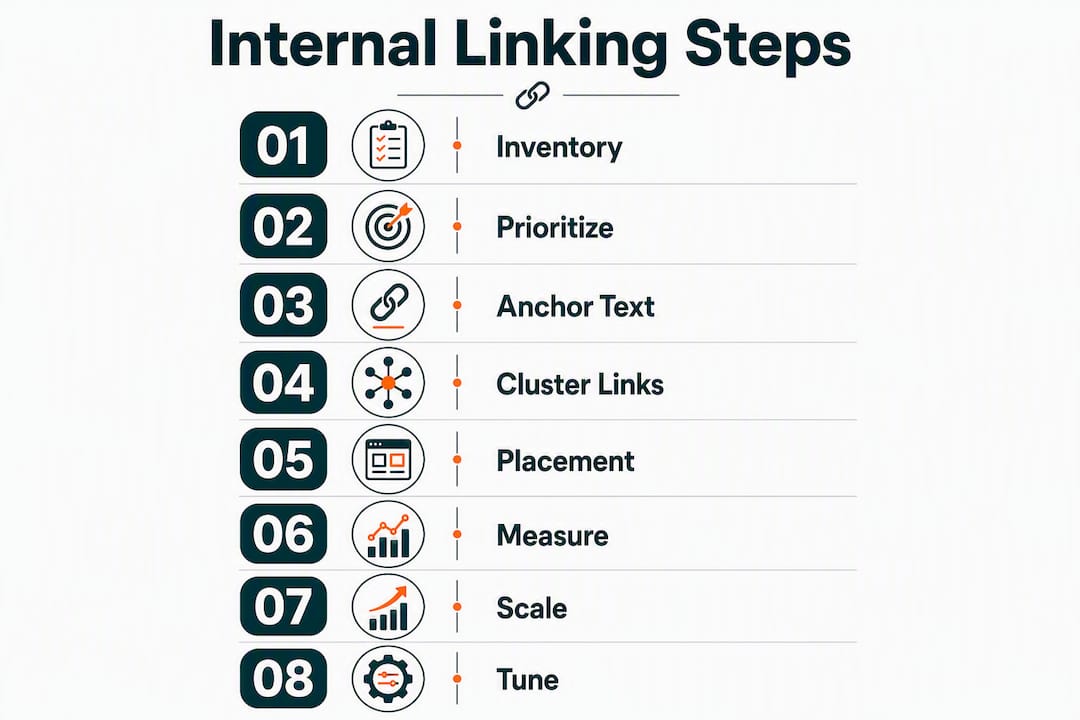
- A practical 8-step internal-linking blueprint
- How to audit and fix your site’s internal links
- Advanced tactics, cadence, and common pitfalls
- Key Takeaways
- The part most guides skip about internal linking
- Ranksector handles the internal-link work you keep putting off
- Useful sources and further reading
How internal linking actually works: a clear definition
An internal link is a hyperlink that connects two pages on the same domain. In HTML it looks like this:
<a href="/seo-guide">complete SEO guide</a>
That single tag does two jobs simultaneously. It gives a human reader a path to related content, and it tells a crawler that the destination page exists and is worth visiting. Both functions matter for rankings.
Internal links appear in several locations across a typical site:
- Body content (contextual links): Placed within paragraphs, these carry the most SEO weight because they appear in context and signal topical relevance.
- Navigation menus: Sitewide links that establish the primary hierarchy of your site.
- Footer links: Useful for legal pages, contact, and key categories, but lower in SEO value.
- Sidebar links: Common on blogs and news sites; treated similarly to footer links by crawlers.
- Breadcrumbs: Structural links that show page hierarchy (Home > Category > Article) and help both users and Googlebot understand depth.
- Programmatic links: Auto-generated links on tag, category, and archive pages.
Placement determines value. A contextual link in the first paragraph of a 2,000-word article carries more weight than the same link in a footer. Contextual links in body content receive higher weight under the Reasonable Surfer model — Google’s patent-backed framework that assigns link value based on the probability a user will actually click it.
Internal links versus external links: what each does for your SEO
The distinction matters because the two types of links solve different problems, and confusing them leads to misallocated effort.
Internal links guide crawlers through your site’s structure, establish topical relationships between pages, and redistribute authority you already have. You control them completely. Adding an internal link costs nothing and takes minutes.
External links (backlinks) are votes of confidence from other domains. They are the primary signal Google uses to judge a page’s authority relative to the broader web. You cannot manufacture them without another site’s cooperation.
Here is a practical scenario. You publish a new article on “B2B SaaS pricing models.” On day one, no external sites link to it. But you can immediately add internal links from your existing pillar page on SaaS growth and from a related post on pricing strategy. Those links tell Googlebot the new article exists, signal its topical relevance, and pass some authority from your established pages. That is internal linking doing its job.
The rule of thumb: spend the first week after publishing a new page on internal links. Spend the following weeks on outreach and content promotion to earn backlinks. Both matter, but internal links are the faster, fully controllable first step.
SEO quick wins for faster rankings almost always start with internal linking because the payoff is immediate and requires no external dependencies.
What types of internal links exist and when to use each
Not all internal links carry equal weight. Understanding the taxonomy helps you place the right link in the right context.
Contextual links are the highest-value type. They sit inside body paragraphs, surrounded by topically relevant text. The anchor text and surrounding content together tell Google what the destination page covers. Use these for your most important target pages and cluster articles.
Pro Tip: Place your most important contextual link in the top 25% of the article body. Links higher on the page tend to receive more clicks and pass more engagement signals.
Navigational links appear in your main menu and define your site’s primary hierarchy. They pass equity to every page they point to on every page load, which makes them powerful but also diluted across many pages. Reserve navigation slots for your highest-priority category and pillar pages.
Footer links work well for utility pages (contact, privacy, sitemap) and secondary categories. They are crawled reliably but carry less topical signal than contextual links. Avoid using footers as a workaround to link to pages that should have contextual links in the body.
Sidebar links behave similarly to footer links from an SEO perspective. On content-heavy sites, sidebars often show “related posts” or “popular articles” widgets. These are fine for UX but should not substitute for in-body contextual links to your priority pages.
Breadcrumbs are underused. They create a clean hierarchical path (Home > Blog > Category > Article) that helps Googlebot understand page depth and topical grouping. WordPress plugins like Yoast SEO and Rank Math generate breadcrumb schema automatically.
Programmatic links on tag and category pages can create thousands of internal links at once. That scale cuts both ways: it helps crawlers discover content, but poorly structured tag pages can also create duplicate content and dilute equity. Audit these pages before relying on them as a linking strategy.
Pro Tip: Anchor text should be descriptive and relevant — avoid “click here” or “read more.” Use natural-language phrases that describe what the reader will find on the destination page, like “B2B pricing strategy guide” instead of “this article.”
Why internal linking matters for SEO: the four mechanisms
Crawlability and indexation speed
Googlebot discovers pages by following links. A page with no internal links pointing to it is effectively invisible to crawlers unless it appears in your XML sitemap. Even then, a page that Googlebot reaches only through a sitemap and never through contextual links is treated as lower priority. Google explicitly states that every page you care about should have at least one internal link pointing to it.
For large sites, crawl budget becomes a real constraint. Googlebot allocates a finite number of crawl requests per site per day. A flat, well-linked architecture means crawlers reach more pages per visit. A deep, poorly linked one means important pages get crawled infrequently or not at all.
Link equity distribution
PageRank flows through links. Your homepage typically has the most external links pointing to it, making it your highest-authority page. Internal links carry some of that authority to other pages. A product page linked from the homepage and from three high-traffic blog posts will accumulate more equity than the same page linked only from a footer.

Pages with a moderate number of total internal links tend to see peak organic traffic before diminishing returns set in. Beyond that threshold, each additional link passes less value. The implication: be selective. Linking to 80 pages from a single article dilutes the value of every link on that page.
Topical authority and AI search
This is where internal linking strategy has shifted most noticeably. AI-powered search engines, including Google’s Search Generative Experience and tools like Perplexity, use site structure to build a semantic map of what a site covers. Semantic internal linking connects related content within a topic cluster and uses natural-language anchors to help AI models build a stronger topical map.

A site with a pillar page on “SaaS content marketing” linked to and from cluster articles on “content calendars,” “B2B blog strategy,” and “SEO for SaaS” signals deep expertise on the topic. A site where those articles exist but are not linked together signals fragmentation. How AI search engines choose citations depends partly on this structural coherence.
User engagement
Internal links keep readers on your site longer and guide them toward conversion pages. A blog post that links to a relevant case study, which links to a pricing page, creates a natural funnel without any paid promotion. Pages with strong internal link networks tend to show lower bounce rates and higher pages-per-session metrics, both of which correlate with stronger rankings over time.
A practical 8-step internal-linking blueprint
Step 1: Inventory and map your current links
Start with a full site crawl using Screaming Frog SEO Spider or a similar tool. Export two reports: “All Inlinks” (pages linking to each URL) and “All Outlinks” (pages each URL links to). This gives you a complete picture of your current link graph before you change anything.
Step 2: Prioritize target pages by SEO value
Score each page on three dimensions: current organic traffic (from Google Search Console), keyword ranking position (pages on page two are high-priority), and conversion value (product pages, demo pages, high-intent landing pages). Pages that score high on conversion value but low on inlinks are your first targets.
Step 3: Choose anchor text with intention
Google documentation emphasizes descriptive, concise anchor text that communicates what the reader will find on the destination page. Use natural-language phrases. Vary the anchor text across different pages linking to the same destination — “SaaS pricing models,” “how SaaS companies price their products,” and “B2B pricing strategy” are all valid anchors for the same target page.
Step 4: Build bidirectional cluster links
The current industry standard requires clusters to link to the pillar page AND for cluster articles to link horizontally to each other when topics overlap. A post on “content calendar templates” should link to the pillar on “SaaS content marketing” and also to the related cluster post on “B2B editorial planning.” This bidirectional web is what AI crawlers use to map topical depth.
Step 5: Apply placement rules
The first contextual link in the top 25% of the article body carries more engagement and ranking value than links lower on the page. Place your highest-priority destination link early. Avoid burying all your internal links in the conclusion or footer.
Step 6: Measure impact after 30 days
Track four metrics: indexation rate (Google Search Console Coverage report), organic traffic to target pages, ranking movement for target keywords, and crawl errors. A page that gains three new internal links and moves from position 14 to position 8 within 30 days is a clear signal the strategy is working.
Pro Tip: Set up a simple Google Sheet that logs each internal link you add: source URL, destination URL, anchor text, and date added. This makes it easy to correlate link additions with ranking changes in GSC.
Step 7: Scale carefully with automation
Automation tools can insert internal links at scale, but they carry risks. Auto-inserted links can appear in awkward contexts, use repetitive anchor text, or create over-linking on high-traffic pages. Internal linking automation has clear use cases and clear failure modes — understand both before deploying it site-wide.
Step 8: Verify and tune iteratively
After each round of link additions, re-crawl the site and compare the new inlink counts against your target pages. Check that no single page now exceeds 50 total internal links. Adjust anchor text if you see repetition patterns building up across multiple source pages.
How to audit and fix your site’s internal links
A structured audit finds the problems that cost you rankings without requiring any new content. Run this checklist quarterly, with a lighter monthly pass for broken links and orphan pages.
| Issue | Detection Method | Priority | Fix |
|---|---|---|---|
| Broken internal links | Screaming Frog “Response Codes” filter | High | Redirect to live page or update link |
| Orphan pages (zero inlinks) | Screaming Frog “Inlinks” filter | High | Add contextual links from relevant pages |
| Redirect chains | Screaming Frog “Redirect Chains” report | Medium | Update links to point to final destination |
| Pages buried 4+ clicks deep | Screaming Frog “Crawl Depth” report | Medium | Add shortcut links from higher-level pages |
| Overlinked pages (50+ links) | Screaming Frog “Outlinks” sorted descending | Medium | Remove low-value or redundant links |
| Generic anchor text (“click here”) | Screaming Frog “Anchor Text” export | Low | Rewrite with descriptive natural-language anchors |
| Keyword cannibalization conflicts | GSC + internal link map cross-reference | Medium | Consolidate pages or adjust anchor text signals |
Orphan pages typically receive little to no organic traffic, according to analysis from SEO experts. That makes orphan fixes the highest-priority item in any audit. A page that exists but has no internal links pointing to it is invisible to both crawlers and users.
For remediation, work in this order. Fix broken links first — they actively destroy equity. Then add contextual links to orphan pages. Then update redirect chains to point directly to final destinations. Finally, prune overlinked pages by removing links that add no topical value.
Technical SEO checks like crawl budget analysis and robots.txt audits complement this process — run them alongside your internal link audit for a complete picture.
Keyword cannibalization is a related issue worth checking during any link audit. When two pages compete for the same keyword, your internal link signals can inadvertently split authority between them.
Advanced tactics, cadence, and common pitfalls
Recommended audit cadence
| Task | Frequency | Tool |
|---|---|---|
| Broken link check | Monthly | Screaming Frog, Google Search Console |
| Orphan page scan | Monthly | Screaming Frog “Inlinks” filter |
| Redirect chain cleanup | Monthly | Screaming Frog “Redirect Chains” |
| Full structural review (depth, clusters, anchor diversity) | Quarterly | Screaming Frog + GSC + manual review |
| Bidirectional cluster audit | Quarterly | Manual content map + crawl export |
| Anchor text diversity check | Quarterly | Screaming Frog “Anchor Text” export |
Bidirectional cluster linking in practice
The bidirectional cluster model requires three link directions: cluster articles link up to the pillar, the pillar links down to each cluster, and cluster articles link horizontally to each other when topics genuinely overlap. This creates a dense topical web that AI search models can map. A cluster article on “SaaS onboarding emails” should link to the pillar on “SaaS email marketing” AND to the related cluster on “trial conversion tactics” if the content overlaps.
Anchor text diversity
Sites with anchor diversity below approximately 30% showed average ranking drops in third-party analysis. If every page linking to your “SaaS pricing guide” uses the exact phrase “SaaS pricing guide” as anchor text, that pattern looks manipulative. Vary the phrasing across source pages while keeping anchors descriptive and relevant.
Warning signs of over-optimization:
- More than three source pages using identical anchor text to the same destination
- A single page with more than 50 outgoing internal links
- Footer or sidebar links duplicating every contextual link in the body
- Auto-inserted links appearing in the first sentence of every article regardless of relevance
E-E-A-T and internal linking
Internal linking supports Experience, Expertise, Authoritativeness, and Trustworthiness signals in a specific way: it shows that your site has depth on a topic, not just a single article. A site with 20 well-linked articles on SaaS content marketing signals expertise more convincingly than a site with 20 disconnected articles on unrelated topics. Internal linking should be user-first — links that feel manipulative or disrupt readability work against perceived quality, and search engines increasingly recognize poor UX as a quality signal.
Common pitfalls and their fixes:
- Redirect chains: Update source links to point directly to the final URL, not through intermediate redirects.
- Orphan pages: Add at least two contextual links from topically related pages to every new page you publish.
- Too many links per page: Keep total outgoing internal links under 50 on any single page. Remove links to low-value or tangential pages first.
- Poor placement: If all your internal links sit in the conclusion or footer, move the highest-priority ones into the first half of the body content.
- Ignoring on-page SEO elements that interact with links: Heading structure, content hierarchy, and meta signals all work together with internal links to communicate page relevance.
Key Takeaways
Internal linking is the highest-ROI SEO tactic you fully control, and contextual links are a high-ROI SEO activity precisely because no external site’s cooperation is required.
| Point | Details |
|---|---|
| Crawl depth drives traffic | Pages 4+ clicks from the homepage receive 9x less organic traffic; keep priority pages within three clicks. |
| Orphan pages cost rankings | Orphan pages receive zero organic traffic in most cases; add contextual links to every new page you publish. |
| Anchor text diversity matters | Maintain varied anchor text across source pages; sites below ~30% diversity showed ranking drops in third-party analysis. |
| Bidirectional clusters build authority | Link pillar to cluster, cluster to pillar, and cluster to cluster when topics overlap to build a dense topical map. |
| Ranksector automates the audit | Ranksector’s AI audit tools surface orphan pages, broken links, and internal-link suggestions without manual crawl exports. |
The part most guides skip about internal linking
Internal linking advice tends to focus on the mechanics: add links, use good anchor text, fix broken ones. That is all correct. But the deeper issue is that most sites treat internal linking as a one-time setup task rather than an ongoing editorial discipline.
The sites that consistently rank well treat their internal link graph the same way a good editor treats a publication’s index: it is a living document that reflects what the site actually covers, updated every time new content is published or old content is retired. When you publish a new article and do not immediately add internal links from three or four related pages, you are not just missing a ranking opportunity. You are signaling to crawlers that the new page is not yet part of your site’s topical fabric.
The bidirectional cluster model matters more now than it did two years ago because AI search engines do not just follow links sequentially. They build a graph of your site’s topical relationships and use that graph to decide whether your site deserves to be cited as an authority on a subject. A site with a dense, coherent link graph on a topic looks like an expert. A site with isolated articles looks like a content farm, regardless of how good the individual articles are.
One practical habit worth building: every time you publish a new article, spend 15 minutes finding three existing pages that should link to it and adding those links before you do anything else. That single habit, applied consistently, compounds into a meaningful structural advantage over six to twelve months.
Ranksector handles the internal-link work you keep putting off
Daily publishing without a system for internal linking creates a growing debt of orphan pages and missed equity transfers. Ranksector’s AI audit surfaces orphan pages, broken links, and internal-link suggestions automatically, so you are not waiting for a quarterly manual crawl to find problems that have been costing you rankings for months.
The platform also generates contextual internal-link suggestions as part of its automated publishing workflow, which means new articles get linked into your existing content structure from day one rather than sitting as orphans. Other approaches exist: manual audits with Screaming Frog, agency retainers, or DIY spreadsheet tracking all work. But for B2B SaaS teams publishing at volume, the manual approach does not scale without dedicated headcount.
Try the free audit tools to see your current orphan page count and broken link total before committing to any workflow change.
Useful sources and further reading
- Google Search Central: Link Best Practices — The primary source for Google’s own guidance on anchor text, crawlable links, and discovery. Start here before any other resource.
- Moz: Internal Links SEO Best Practices — Covers link equity distribution, site architecture, and the role of internal links in spreading PageRank. Useful for understanding the equity mechanics.
- Search Engine Land: Internal Links — Types, Strategies & Tools — Covers link types, UX considerations, and E-E-A-T implications of internal linking decisions.
- SEO Shouts: Internal Linking for SEO — The Complete Guide — Source for the crawl-depth traffic data, orphan page statistics, and anchor diversity thresholds cited throughout this article.
- Ranksector: Free SEO Tools for Entrepreneurs — Practical tool recommendations for small teams running internal-link audits without an enterprise budget.
Recommended
- Internal Linking Automation: When It Helps, When It Hurts · Ranksector Blog — Ranksector
- Types of SEO Quick Wins for Faster Rankings in 2026 · Ranksector Blog — Ranksector
- Why SEO Beats PPC Long Term: 2026 Expert Guide · Ranksector Blog — Ranksector
- How Search Engines Rank Websites: 2026 Guide · Ranksector Blog — Ranksector