
SEO ROI Tracking for Bootstrapped Businesses: A Practical Guide
Yes, a bootstrapped business can produce a defensible SEO return on investment number this week, using tools you likely already have. The core formula is straightforward: SEO ROI = (Value of organic conversions − Total SEO cost) ÷ Total SEO cost × 100. A positive result means you earned more than your investment in the organic channel. Three actions to take right now:
- Log every SEO cost — freelancer fees, tool subscriptions, and your own time at an hourly rate.
- Enable GA4 conversion events for organic traffic — purchases, form fills, trial signups, or phone calls.
- Assign a dollar value to each conversion type — transaction revenue for ecommerce, or close rate × average deal value for leads.
The full tracking stack you need: Google Analytics 4 (GA4), Google Tag Manager (GTM), Google Search Console, and optionally Semrush for keyword and rank visibility. You do not need an enterprise analytics contract to get reliable numbers. GA4, Search Console, and an honest spreadsheet are sufficient for the core math.
Key Takeaways
Bootstrapped SEO ROI tracking works with GA4, GTM, Search Console, and a spreadsheet — the formula is simple, the discipline of consistent measurement is what separates teams that prove value from those that guess.
| Point | Details |
|---|---|
| Use the core formula | (Organic revenue − SEO cost) ÷ SEO cost × 100; measure monthly, report quarterly trends. |
| Count every cost | Include staff time, tool subscriptions, freelancer fees, and link-building in the investment figure. |
| Report two revenue numbers | Last-click attributed revenue for finance; assisted/influenced revenue from GA4 paths for the full picture. |
| Allow 6–18 months | Meaningful ROI typically requires 6–18 months; plan conservative and optimistic scenarios from month one. |
| Ranksector accelerates the curve | Automated daily publishing lowers per-article cost and builds content volume faster than manual production. |
Table of Contents
- What does SEO ROI actually mean for a bootstrapped team?
- Step 1: How do you calculate your total SEO investment?
- Step 2: How do you measure revenue from organic search?
- Step 3: What tracking setup do you actually need in GA4, GTM, and Search Console?
- Which attribution model should you use when reporting SEO ROI?
- How long does SEO take to show ROI, and how do you forecast it?
- What are the most common SEO tracking mistakes, and how do you fix them?
- Which low-cost tactics improve SEO ROI fastest for bootstrapped teams?
- What should your SEO ROI dashboard include?
- Worked examples: ecommerce and lead-gen ROI calculations
- What we see work for bootstrapped companies
- Ranksector makes the content side of this equation manageable
- Sources
What does SEO ROI actually mean for a bootstrapped team?
SEO return on investment, often called organic search ROI, is the net revenue your organic channel generates relative to what you spent to produce it. The canonical formula, as detailed by Keygrow, is:
(Attributed organic revenue − Total SEO investment) ÷ Total SEO investment × 100
A negative result tells you the channel is not yet paying for itself, which is useful data, not a failure signal, since SEO compounds over time.
Why does this metric matter more than rankings or traffic for a bootstrapped team? Because rankings and sessions don’t pay salaries. When you’re allocating a limited budget across content, tools, and your own time, you need a number that maps directly to revenue decisions. A page ranking #3 for a keyword with zero commercial intent contributes nothing to ROI. A page ranking #8 for a high-intent buyer keyword might be your top revenue asset.
Well-executed SEO programs tend to produce materially higher long-term returns than paid advertising because the content asset keeps working after you stop paying for it. Industry benchmarks from The HOTH treat these as directional figures, but the directional case is consistent: organic compounds, paid stops.
Conversions that map directly to revenue include ecommerce transactions (GA4 captures the dollar amount automatically) and SaaS trial activations with a known conversion-to-paid rate. Conversions that need valuation include contact form submissions, demo requests, and phone calls — each requires you to assign a dollar value based on your historical close rate and average deal size. Multiple valid ROI methods exist, from revenue-based to traffic-value to LTV-based; pick the one that matches your business model and state your assumptions clearly so stakeholders can follow the math.
For a broader view of how search visibility drives competitive advantage, the non-financial benefits of ranking authority compound alongside revenue, though they’re harder to quantify in a monthly report.
Step 1: How do you calculate your total SEO investment?
Every dollar you spend on organic search belongs in the investment figure. Missing a cost category inflates your ROI and sets false expectations. Here’s the complete list:
- Agency or freelancer fees — monthly retainers, per-project content writing, technical SEO audits.
- Tool subscriptions — Semrush, Ahrefs, or similar rank trackers; GA4 (free tier covers most small teams); any paid Search Console integrations.
- Content production — writer fees, editor fees, graphic design for blog assets, video production tied to organic content.
- Link-building costs — outreach tools, digital PR fees, any paid placements that support organic authority.
- Paid promotion of organic content — social ads used to seed content distribution (include the portion attributable to organic amplification).
- Internal staff time — your own hours and any team member hours spent on SEO tasks, valued at a realistic hourly rate.
Short numeric example. Say your monthly SEO spend breaks down as: $800 freelance writer, $120 Semrush subscription, $200 link-building outreach tool, and 10 hours of your own time at $75/hour ($750). Total monthly investment: $1,870. Annualized: $22,440. That’s the denominator in your ROI formula.
For one-off costs — a technical audit at $2,000, for example — spread the cost across the months it benefits. A 12-month audit amortizes to $167/month. This cohort accounting keeps your monthly ROI comparable across periods rather than creating a spike in the month you paid the invoice. A similar logic applies when comparing agency costs against automated platform alternatives, where the fully-loaded cost picture often looks very different from the headline retainer.
Pro Tip: Create a dedicated “SEO spend” tag in your accounting software or finance spreadsheet from day one. Mixing SEO costs with general marketing spend makes it nearly impossible to isolate the ROI calculation later without a painful manual audit.
Step 2: How do you measure revenue from organic search?
The method depends on your business model. Ecommerce and lead-gen require different approaches, but both are tractable with GA4.
For ecommerce businesses, GA4’s ecommerce event tracking captures transaction revenue at the session level. Filter your GA4 reports to the “Organic Search” channel grouping, and the revenue figure is already there. The key setup requirement is that your purchase event passes the value parameter correctly — without it, GA4 records the conversion but not the dollar amount.
For lead-gen and SaaS businesses, you need to assign a dollar value to each lead. Two defensible methods:
- Method A (close rate × deal value): If your average deal is $4,000 and your lead-to-customer close rate is 15%, each lead is worth $600. Ten organic leads in a month = $6,000 in attributed revenue.
- Method B (paid-lead-cost floor): If you pay $250 per lead through Google Ads, use $250 as a conservative floor value for organic leads. This understates true value but is hard to argue with in a CFO meeting.
Worked example using Method A. In March, your organic channel delivered 18 contact form submissions. Average contract value: $5,500.
Lead value = $5,500 × 0.12 = $660 per lead Attributed organic revenue = 18 × $660 = $11,880 Monthly SEO cost = $1,870 (from Step 1) SEO ROI = ($11,880 − $1,870) ÷ $1,870 × 100 = 535%
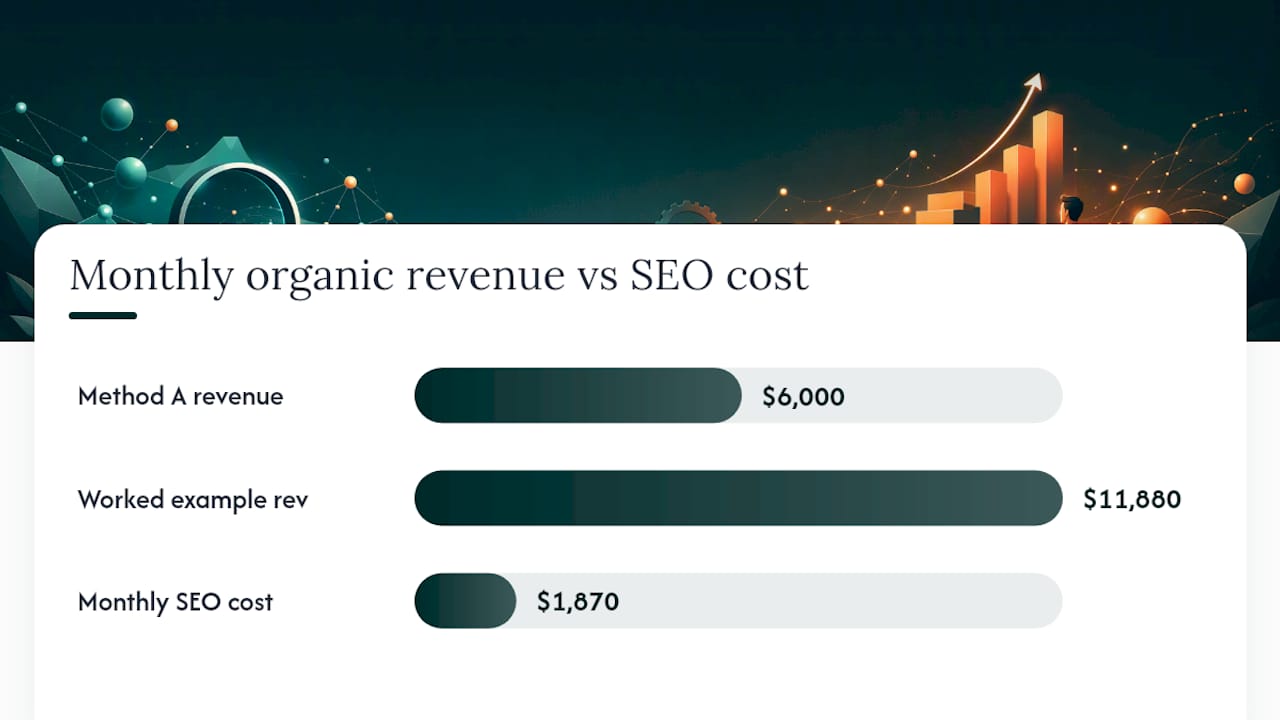
Assigning lead value using close rate × average deal value is defensible precisely because it uses your own historical numbers, not industry averages. For more on how SaaS and B2B teams assign conversion values, the same close-rate logic applies to trial-to-paid conversions.
Two valuation traps to avoid. First, don’t apply your overall close rate to cold top-of-funnel leads — segment by lead quality or use a blended rate that reflects the actual mix of organic traffic intent. Second, branded search conversions (people who already knew your name) inflate organic ROI if you count them alongside non-branded conversions. Separate them in GA4 using a custom channel grouping or a regex filter on brand terms.
The single most common ROI calculation error for small teams is mixing branded and non-branded organic conversions into one revenue figure. Branded conversions often close at 3–5× the rate of non-branded ones, so a blended number overstates what your SEO content actually produced.
Step 3: What tracking setup do you actually need in GA4, GTM, and Search Console?
Accurate ROI math requires accurate data capture. Here’s the setup sequence:
- Add your GA4 Measurement ID to your site — either directly in the site’s
<head>or via a GTM container tag. Confirm data is flowing in GA4’s Realtime report. - Deploy conversion event tags in GTM — create triggers for form submissions, purchase completions, trial signups, and phone click events. Tag each with the appropriate GA4 event name (
generate_lead,purchase,begin_checkout). - Link Google Search Console to GA4 — in GA4’s Admin panel under “Search Console Links.” This surfaces organic query data inside GA4 and lets you correlate keyword impressions with conversion paths.
- Verify organic channel grouping — in GA4’s channel grouping settings, confirm “Organic Search” is correctly defined. Misconfigured groupings push organic sessions into “Unassigned” or “Direct,” which silently destroys your ROI data.
- Set up UTM naming conventions for any content you promote externally. Use a consistent structure:
utm_source=blog,utm_medium=organic,utm_campaign=[topic-slug]. This prevents blog referral traffic from collapsing into “Referral” and obscuring organic performance. - Add phone call tracking — if calls are a conversion type, use a call tracking tool that fires a GA4 event when a call originates from an organic landing page. Without this, phone-driven revenue is invisible in your ROI calculation.
Tools checklist:
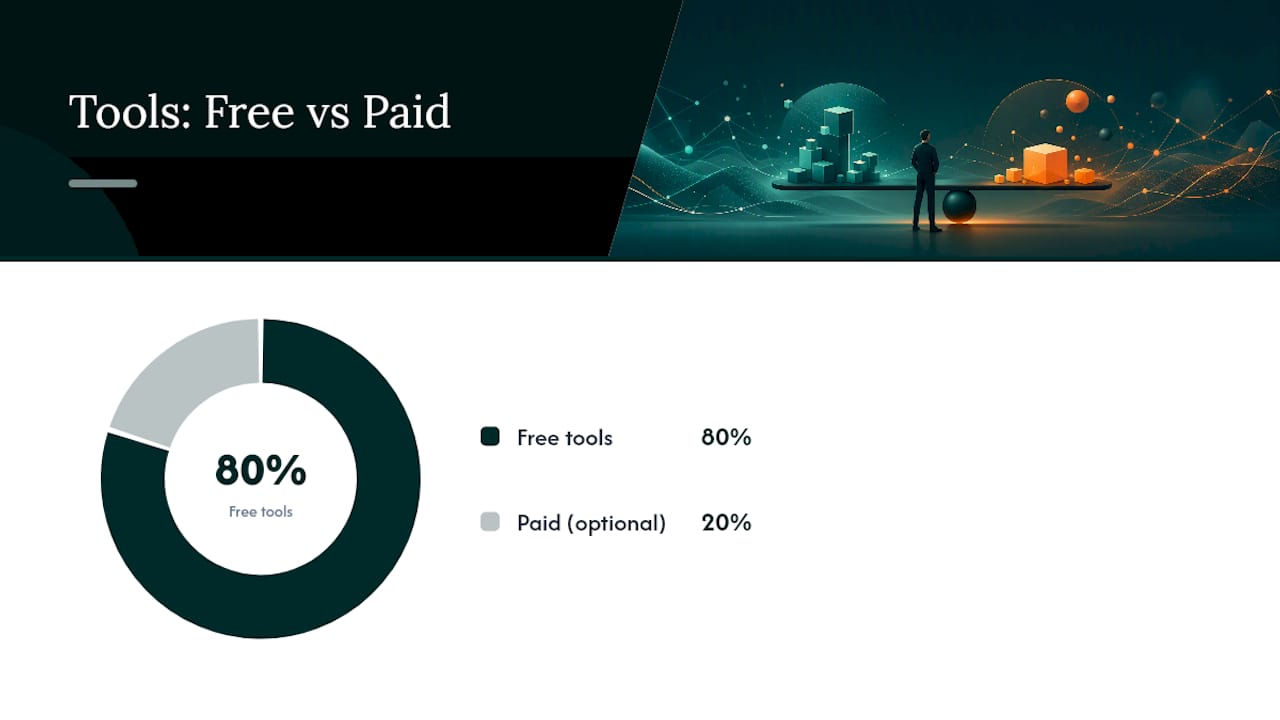
- GA4 (free) — conversion tracking, channel attribution, path reports
- GTM (free) — tag deployment without developer dependency
- Google Search Console (free) — query data, impressions, click-through rates
- Semrush (paid, optional) — rank tracking, keyword gap analysis, visibility monitoring
- Ranksector free tools — keyword research and content planning utilities for small teams
Pro Tip: Use GTM’s Preview mode to test every event tag before publishing. A tag that fires on every page view instead of only on the thank-you page will inflate your conversion count and make your ROI look far better than it is — until someone checks the CRM.
For a deeper look at when paid tools like Semrush are worth the cost versus free alternatives, the decision usually comes down to whether you need competitive keyword data or rank tracking at scale.
Which attribution model should you use when reporting SEO ROI?
Attribution is where most small-team SEO reports break down. Here’s a plain-language summary of the main models and a practical recommendation.
| Attribution Model | How It Works | Best Use Case | SEO Implication |
|---|---|---|---|
| Last-click | 100% credit to the final touchpoint before conversion | Conservative CFO reporting | Undercounts SEO’s role when organic assisted earlier |
| Linear | Equal credit across all touchpoints in the path | Multi-channel analysis | More accurate but harder to explain |
| Time-decay | More credit to touchpoints closer to conversion | Short sales cycles | Still undercounts early organic assists |
| Data-driven (GA4) | ML-based credit distribution using your actual path data | Best accuracy, needs volume | Requires sufficient conversion data to activate |
| Assisted conversions | Shows conversions where the channel appeared but wasn’t last | Influence reporting | Reveals SEO’s full contribution |
The practical recommendation for bootstrapped teams: report two numbers, not one.
Report a conservative last-click attributed revenue figure for finance stakeholders, and an assisted/influence figure from GA4’s path reports or a CRM sample to show SEO’s fuller contribution. Presenting both builds credibility — you’re not hiding the conservative number, and you’re not letting last-click alone bury the channel’s real impact.
Last-click attribution consistently undercounts SEO because organic search often appears in the middle of a multi-session journey — a user reads a blog post, leaves, returns via a branded search, and converts. Last-click gives the branded search all the credit. A simple CRM audit of 20–30 closed deals, checking whether any touchpoint in the path was organic, gives you a defensible influence percentage without needing full attribution modeling. GA4’s path exploration report surfaces this data directly when you have enough conversion volume.
How long does SEO take to show ROI, and how do you forecast it?
SEO compounds. Content published today can generate traffic and conversions for years with periodic updates, which is why cohort tracking and payback visuals are the most persuasive format for founders and finance teams. They show exactly when the investment turns to net profit.
Realistic time windows: early organic traction typically appears at 3–6 months for low-competition keywords; meaningful, reportable ROI usually requires 6–18 months depending on domain authority and competitive intensity. Plan for both.
Simple projection template (six steps):
- Estimate monthly organic traffic growth rate based on your current trajectory or a target keyword cluster’s search volume.
- Apply a position-based CTR assumption — position 1 averages roughly 27–39% CTR for navigational queries, but for informational content in competitive niches, model 3–8% for positions 4–10.
- Multiply projected sessions by your site’s organic conversion rate (use your current GA4 data as the baseline).
- Multiply conversions by your assigned lead value or average order value.
- Subtract cumulative SEO cost to get net ROI at each month.
- Plot the cumulative curve to identify your payback month.
The gap between scenarios usually comes from conversion rate, not traffic volume. That’s why improving conversion on pages that already have traffic often wins faster ROI than creating net-new content. Update the forecast monthly as real GA4 data arrives — replace assumptions with actuals as soon as you have them. AI overviews and zero-click SERP features have compressed organic CTRs for some positions, so model both a conservative and an optimistic CTR rather than relying on a single benchmark.
For keyword position tracking that feeds your forecast with real rank data, a dedicated rank tracker gives you the position inputs your projection model needs.
What are the most common SEO tracking mistakes, and how do you fix them?
Bad data produces confident wrong answers. These are the issues that silently corrupt ROI numbers for small teams.
Red flags to watch for:
- Organic conversions drop sharply while Search Console shows stable or rising impressions and clicks.
- Revenue attributed to “Direct” spikes on the same pages where organic landing sessions are high.
- GA4 shows duplicate purchase events (fires twice on the same transaction).
- Phone call volume rises but GA4 shows no corresponding conversion events.
Quick validation checks:
- Run GTM’s Preview/Debug mode and manually trigger each conversion event to confirm it fires once, on the correct page, with the correct parameters.
- Compare GA4 organic sessions for your top landing pages against Search Console clicks for the same URLs over the same date range. A large gap signals a tracking or channel grouping problem.
- Pull 20–30 recent closed deals from your CRM and check whether any session in the customer’s history touched an organic landing page. This sample audit validates your lead value assumptions.
When to escalate: If GTM debug shows tags firing correctly but GA4 still shows no events, the issue is likely a Content Security Policy blocking the GA4 script, or a cookie consent tool suppressing it before consent. These require a developer to fix. Everything else — misconfigured triggers, wrong event names, missing value parameters — you can resolve in GTM without engineering support.
Which low-cost tactics improve SEO ROI fastest for bootstrapped teams?
Measurement without action is just reporting. These tactics produce the fastest ROI improvement relative to their cost, ordered by typical impact:
- Fix high-intent landing pages first. A page ranking on page one for a buyer-intent keyword but converting at 0.5% is a revenue leak. Rewrite the CTA, add social proof, and test a cleaner form. Conversion rate improvements on existing traffic pay back immediately.
- Refresh and expand your top organic pages. Update the top 10 traffic-driving pages with current information, conversion-focused copy, and internal links to your money pages. This costs writer time, not new traffic acquisition.
- Build internal links from high-authority pages to conversion pages. A blog post with 500 monthly organic sessions and no internal link to your pricing page is leaving revenue on the table. Scrappy internal linking is one of the highest-ROI tactics available to a small team.
- Target long-tail, buyer-intent keywords. A keyword like “best CRM for solo consultants” converts at a far higher rate than “what is a CRM.” Long-tail content is also less competitive, meaning faster ranking timelines.
- Reclaim dark traffic. Sessions arriving without UTM parameters get misattributed to “Direct.” Audit your top referral sources and add UTMs to any content you distribute via email, social, or partnerships.
Pro Tip: Use Semrush’s Keyword Magic Tool filtered by keyword difficulty below 30 and intent set to “Transactional” or “Commercial” to find high-intent, low-competition targets your site can realistically rank for within 90 days. Track each target in a dedicated tab in your ROI spreadsheet so you can measure the revenue contribution of each content piece individually.
For a structured list of quick SEO wins that bootstrapped teams can execute without a large budget, the priority order above holds across most business models. And if you’re comparing SEO’s long-term cost per lead against paid search, the compounding nature of organic content is where the math becomes compelling for resource-constrained teams.
What should your SEO ROI dashboard include?
A good dashboard serves two audiences: the founder or finance lead who wants revenue and cost clarity, and the operator who needs to know what to do next. Keep them separate.
Executive-facing KPIs:
| KPI | What It Shows | How to Calculate |
|---|---|---|
| SEO-attributed revenue | Conservative organic revenue (last-click) | GA4 organic conversions × conversion value |
| SEO-influenced revenue | Fuller organic contribution | Attributed + assisted conversions from GA4 paths |
| SEO ROI % | Return on investment | (Revenue − Cost) ÷ Cost × 100 |
| Organic cost-per-lead | Efficiency vs. paid channels | Total SEO cost ÷ organic leads |
| Payback period | Months to break even | Cumulative cost ÷ monthly net revenue |
| Top content by revenue | Which assets drive results | GA4 landing page report filtered to organic |
Operator-facing metrics (keep out of the executive view to avoid noise): rank distribution by keyword cluster, backlink growth rate, crawl error counts, and page speed scores.
The most persuasive frame for a finance audience is the cumulative ROI curve by cohort — it shows the month the investment turned to net profit and makes the compounding argument visually. SEO’s long-term CPL advantage over PPC becomes obvious when you plot both on the same axis. For a broader visibility perspective, the online visibility checklist for entrepreneurs covers brand signals and secondary conversion proxies that complement the revenue-focused dashboard.
Wire these metrics into a Google Sheet with monthly tabs. Each tab holds: total SEO cost, organic conversions by type, revenue attributed, ROI %, and CPL. A simple line chart of cumulative ROI by cohort takes 10 minutes to build and is the single most effective visual for a planning conversation.
Worked examples: ecommerce and lead-gen ROI calculations
Ecommerce example (monthly):
- Organic sessions: 3,200
- Organic transactions (GA4 ecommerce): 64
- Average order value: $85
- Attributed organic revenue: 64 × $85 = $5,440
- Total SEO cost: $1,200 (writer $700 + Semrush $120 + 5 hours owner time at $76/hr = $380)
- SEO ROI: ($5,440 − $1,200) ÷ $1,200 × 100 = 353%
- Annualized revenue: $65,280 | Annualized cost: $14,400 | Annual ROI: 353%
Lead-gen example (monthly):
- Organic leads (form submissions): 22
- Historical close rate: 10%
- Average contract value: $3,800
- Lead value: $3,800 × 0.10 = $380 per lead
- Attributed organic revenue: 22 × $380 = $8,360
- Total SEO cost: $1,870
- SEO ROI: ($8,360 − $1,870) ÷ $1,870 × 100 = 347%
Spreadsheet formula snippets to paste into your sheet:
- Lead value:
=B2*C2(average deal value × close rate) - Attributed revenue:
=D2*E2(lead value × organic lead count) - ROI %:
=(F2-G2)/G2*100(attributed revenue minus cost, divided by cost) - Payback month: use a cumulative sum column and
=MATCH(0,SIGN(H2:H14),1)to find the first month cumulative net turns positive
Content published today can generate traffic and conversions for years with periodic updates, which is why the annualized view of these monthly numbers matters. For low-budget publishing approaches that extend the compounding curve, consistent cadence matters more than volume in the early months.
What we see work for bootstrapped companies
The bootstrapped teams that produce reliable SEO ROI share one habit: they track cohorts, not just monthly totals. A monthly ROI number tells you whether last month was good. A cohort view — where you group content published in a given quarter and track its cumulative revenue contribution over 12–18 months — tells you whether your SEO program is actually building an asset.
The discipline that separates teams that prove ROI from those that abandon SEO after six months is conservative forecasting paired with consistent publishing. Bootstrapped founders who win with SEO tend to publish on a fixed cadence — even two well-researched articles per month beats an irregular burst of ten — because search engines reward consistency and so does compounding traffic math.
Ranksector’s automated publishing platform is built around exactly this insight: over 11,000 articles published across client sites, with daily cadence that small teams cannot sustain manually. The compounding curve starts earlier when the content volume is consistent from month one.
Ranksector makes the content side of this equation manageable
The ROI math in this guide works. The harder problem for most bootstrapped teams is producing enough content, consistently enough, to make the compounding curve visible within a reasonable timeframe. A single founder writing two posts per month will see results, but slowly.
Ranksector automates daily SEO-optimized article publishing directly to your CMS, with built-in Google Search Console integration so the analytics layer connects from day one. The platform’s competitive keyword research identifies the high-intent, low-competition targets your ROI spreadsheet needs, and its backlink exchange network builds domain authority without manual outreach. For bootstrapped teams, the per-article cost of automated publishing is a fraction of freelance rates, which means the investment figure in your ROI formula drops while content volume rises. That combination accelerates the payback curve. Start with Ranksector’s free tools to run your first keyword analysis, or explore the full automated publishing platform to see what a consistent daily cadence looks like for your niche.
Sources
These are the primary references that back the methods and formulas in this guide:
- How to Measure SEO ROI (With a Worked Example)
- SEO ROI: Maximize Returns with Proven Strategies
- 8 SEO ROI Measurement Methods (Formulas + Examples)
Recommended
- Rank on Google With a Low Budget: 2026 Guide · Ranksector Blog — Ranksector
- Keyword Position Tracking: A 2026 Guide for SEO Specialists · Ranksector Blog — Ranksector
- Scrappy SEO Strategies: Low-Cost Examples That Work · Ranksector Blog — Ranksector
- How SEO Works Without Paid Ads for B2B SaaS · Ranksector Blog · Ranksector