
How SEO Content Audits Work for Content Strategists
An SEO content audit is a structured review that finds which pages to keep, improve, consolidate, or remove to grow organic traffic and conversions. It works in two stages: a content inventory (a quantitative list of every URL and its metadata) followed by a qualitative audit (a judgment-based review of quality, relevance, and strategic fit). Together, they produce a prioritized action plan your team can execute in sprints.
The immediate outputs of a well-run audit include:
- Keep / Update / Consolidate / Delete decisions for every page
- A prioritized roadmap grouped by impact and effort
- Quick wins: pages in positions 5–20 that need a single targeted update to move up
Table of Contents
- Content inventory vs. content audit: what’s the difference?
- How to perform an SEO content audit step by step
- Which metrics and tools should you collect per URL?
- What problems do audits typically uncover?
- What does resourcing and timing look like?
- Key Takeaways
- Why the inventory-first sequence matters more than most guides admit
- Ranksector cuts the manual work out of your audit pipeline
- Useful sources and tool documentation
Content inventory vs. content audit: what’s the difference?
Conflating these two tasks is one of the most common mistakes teams make, and it slows everything down. Nielsen Norman Group recommends separating the quantitative inventory from the qualitative audit as industry best practice, because each task requires different skills and different data sources.
| Dimension | Content Inventory | Content Audit |
|---|---|---|
| What it captures | URLs, titles, meta descriptions, word count, publish date, status codes, canonical tags | Quality, E-E-A-T, accuracy, goal alignment, ROT (Redundant, Outdated, Trivial) |
| Who owns it | SEO lead or analyst | Content strategist or subject-matter expert |
| Primary tools | Screaming Frog, CMS export, GSC sitemap | Human review, heuristics, heat maps, GA4 engagement data |
| Output | Master spreadsheet of all URLs | Action labels: Keep / Update / Consolidate / Delete |
The inventory is the foundation. You cannot make defensible qualitative judgments without first knowing what exists, where it lives, and how it performs. Wikipedia’s content audit entry notes that audits also use ROT analysis, heuristics, and social or SEO analysis to evaluate whether content is still serving its purpose.
How to perform an SEO content audit step by step
This is a repeatable eight-step workflow. Adjust scope and tooling to your site size, but keep the sequence intact.
- Create the content inventory — Crawl the site with Screaming Frog SEO Spider, export your XML sitemap, and pull a CMS export. Cross-reference to catch orphan pages a crawl alone misses.
- Collect performance data — Pull organic clicks, impressions, average position, and CTR from Google Search Console. Pull sessions, engagement time, and conversions from Google Analytics 4. Add backlink counts from Ahrefs or Semrush.
- Assess technical health first. Fix crawlability and indexability issues before touching content. Atlas Marketing’s SEO audit guide confirms that crawlers must see your pages before any content change can take effect. Check Core Web Vitals with Lighthouse or PageSpeed Insights.
- Check AI visibility. Verify Bing index coverage in Bing Webmaster Tools and confirm that GPTBot and OAI-SearchBot are not blocked in robots.txt. IndexCraft’s SEO audit guide notes that LLM-powered search depends on different indexes and extraction patterns than Google, so this check is now a standard audit step.
- Assign action labels. Apply Keep / Update / Consolidate & redirect / Delete (or noindex) to every URL, tied to the business goal each page serves. Mightybytes’ content audit guide ties these decisions directly to conversions and editorial alignment.
Pro Tip: Use Screaming Frog’s API integration to pull GSC and GA4 data directly into your crawl export. It saves hours of manual VLOOKUP work and keeps all fields in one sheet.
Which metrics and tools should you collect per URL?
The master audit sheet is only as useful as the fields it contains. Here is the core set, mapped to the tool that extracts each one:
| Field | Tool | Why it matters |
|---|---|---|
| Organic clicks & impressions | Google Search Console | Measures actual search demand for the page |
| Average position | Google Search Console | Identifies pages in positions 5–20 ripe for a quick update |
| Sessions & engagement time | Google Analytics 4 | Shows whether visitors stay and engage after landing |
| Conversions | Google Analytics 4 | Connects content performance to revenue |
| Referring domains & backlinks | Ahrefs or Semrush | Flags high-authority pages worth preserving |
| Status code & canonical | Screaming Frog SEO Spider | Catches redirect chains, 404s, and canonicalization errors |
| Index state | Google Search Console (Coverage) | Confirms the page is actually indexed |
| Core Web Vitals (LCP, CLS, TTFB) | Lighthouse / PageSpeed Insights | Surfaces speed issues that suppress rankings |
| Word count & last updated | Screaming Frog / CMS export | Identifies thin or stale content |
Semrush’s content audit guide recommends using a template that consolidates all these fields with action labels so the sheet scales across large sites without losing consistency. HubSpot Website Grader can supplement this with a quick site-level health score to benchmark before and after the audit.
For keyword gap analysis, add a column for the primary target keyword per URL and flag pages with no clear keyword focus.
What problems do audits typically uncover?
Most sites share the same cluster of issues. Knowing what to look for speeds up the review considerably.
- Index bloat: Hundreds of thin, auto-generated, or parameter-based URLs consuming crawl budget. Detection: compare your sitemap URL count to GSC’s indexed page count. Fix: noindex or redirect low-value pages, then consolidate where possible. Screaming Frog’s audit guide recommends using link score data to identify orphan pages that crawlers rarely reach.
- Thin and duplicate content: Pages under 300 words with no unique value, or near-duplicate posts targeting the same keyword. Fix: consolidate into a single authoritative page and 301-redirect the others.
- Keyword cannibalization: Two or more pages competing for the same query, splitting ranking signals. Fix: pick the stronger page, merge content from the weaker one, and redirect.
- JavaScript rendering gaps: Content that exists in the DOM but is not visible to Googlebot because it renders client-side. Fix: compare raw HTML crawl vs. rendered crawl in Screaming Frog; prioritize server-side rendering or pre-rendering for critical content.
- Core Web Vitals failures: LCP above 2.5 seconds, CLS above 0.1, or high TTFB. Fixing image-related LCP and CLS issues is often the fastest path to a passing score. Page speed directly affects rankings, so these fixes belong in the first sprint.
- Broken links and redirect loops: Internal links pointing to 404s or chains of three or more redirects. Fix: update internal links to point directly to the canonical destination.
Fixing technical issues before content improvements is not optional sequencing — it is the only logical order. A perfectly rewritten page that Googlebot cannot crawl or render will not move in rankings. Unblock the crawler first, then invest in content quality.
What does resourcing and timing look like?
Audit scope drives timeline. Here is a realistic breakdown:
- Small site (under 200 pages): — 1–2 weeks. One SEO lead can run the full process solo with Screaming Frog and GSC.
- Large or enterprise site (2,000+ pages): Phased over months. Timothy Prestianni’s audit guide recommends starting with high-traffic subfolders, then moving to pages in positions 5–20, then tackling low or zero-traffic folders last.
Required roles across any audit:
A phased approach prevents audit paralysis on large sites. Delivering early wins on the top-traffic subfolder builds internal momentum and justifies continued investment.
Key Takeaways
An SEO content audit works by combining a quantitative content inventory with a qualitative page-by-page review, then converting findings into a prioritized sprint roadmap with named owners.
| Point | Details |
|---|---|
| Separate inventory from audit | Run the quantitative crawl first; qualitative review only after all URL data is collected. |
| Fix technical issues first | Crawlability and Core Web Vitals fixes must precede content updates to have any ranking effect. |
| Use Keep / Update / Consolidate / Delete | Every URL needs one of these four labels tied to a business goal and a named owner. |
| Phase large-site audits | Start with high-traffic subfolders to deliver quick wins before tackling low-traffic pages. |
| Ranksector automates the pipeline | Ranksector handles inventory exports, suggested update lists, and refreshed content publishing to reduce manual audit work. |
Why the inventory-first sequence matters more than most guides admit
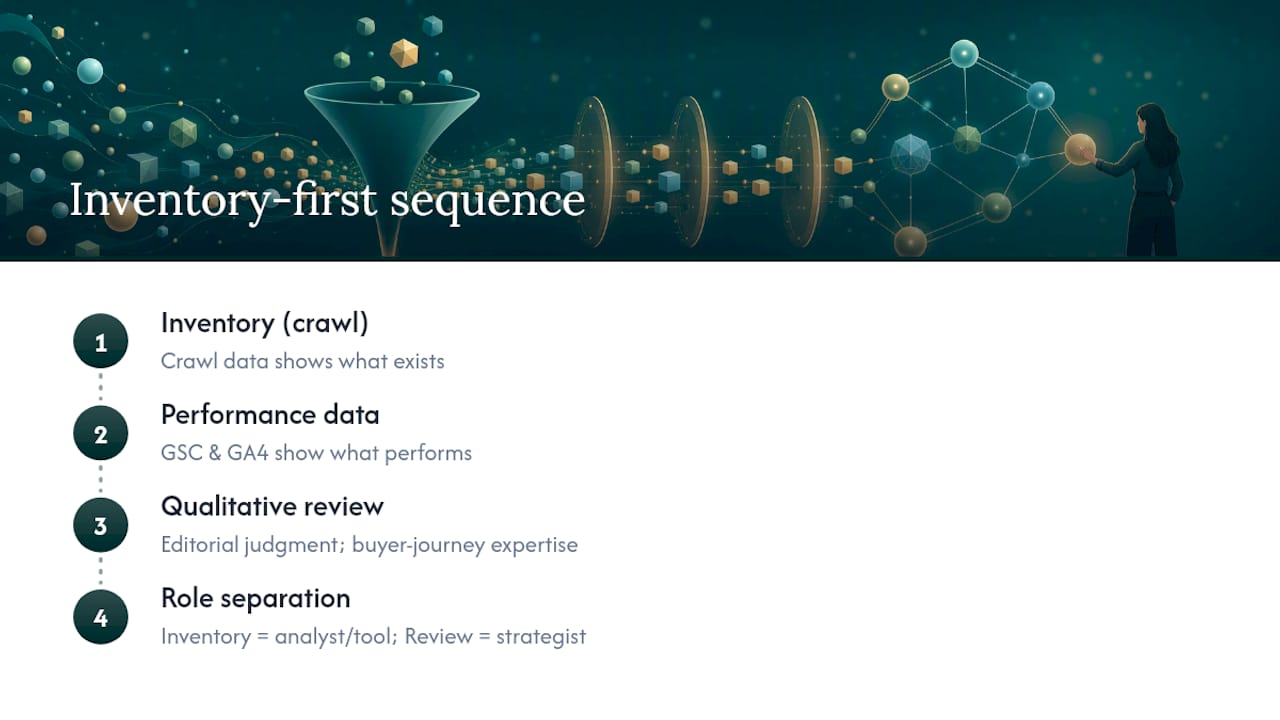
Most audit guides treat the inventory as a formality and rush to the qualitative review. That order feels productive, but it produces unreliable decisions. When you score content quality before you have complete performance data, you end up keeping pages that look good but drive no traffic, and deleting pages with thin copy that actually hold strong backlinks.
The sequence matters because each stage informs the next. Crawl data tells you what exists. GSC and GA4 data tell you what performs. Only then does qualitative judgment have a reliable foundation. Skipping or compressing the inventory stage is the single most common reason audit roadmaps stall after the first sprint.
There is also a practical argument for separating the two tasks by role. Inventory work is analytical and repeatable; a junior analyst or an automated tool can do most of it. Qualitative review requires editorial judgment, subject-matter knowledge, and an understanding of the buyer’s journey. Mixing the two in one pass tends to produce a sheet that is neither rigorous enough for the analyst nor strategic enough for the content lead.
The automation tools that handle inventory assembly well, including Ranksector’s export and scheduling features, are most valuable precisely because they free the content strategist to focus entirely on the judgment layer, where the real value is created.
Ranksector cuts the manual work out of your audit pipeline
Running a full audit manually means hours of crawl exports, spreadsheet merges, and data pulls before you write a single content decision. Ranksector gives content teams a faster path: automated inventory exports, GSC-connected performance signals, suggested update lists, and direct CMS publishing for refreshed pages, all in one workflow.
The Ranksector AI audit tool also checks AI visibility signals that most standard audit checklists miss, including content structure for LLM extraction and Bing index coverage. For teams that want to go further, the agency product includes a full automated publishing workflow so audit-flagged pages get updated and live without a manual handoff. Start with the free tools to run your first automated inventory export today.
Useful sources and tool documentation
The sources below are the primary references used in this article, along with notes on where each fits in the audit workflow:
| Source | Best used for |
|---|---|
| Nielsen Norman Group: Content Audits | Separating inventory from qualitative audit; methodology best practices |
| Wikipedia: Content Audit | ROT analysis definitions and audit method overview |
| HubSpot: SEO Audit Guide | Holistic audit checklist covering technical, content, backlinks, and AI visibility |
| Screaming Frog: SEO Content Audit | Index bloat detection, crawl-analysis workflows, and link score usage |
| Mightybytes: How to Run a Content Audit | Keep / Update / Consolidate / Delete decision framework |
| Timothy Prestianni: Website Content Audit | Phased audit approach for large sites; Screaming Frog and API data pulls |
| Semrush: Content Audit Guide | Template-driven audit process; standardized field names and action labels |
| Atlas Marketing: SEO Audit Guide | Audit sequencing: technical first, then content, backlinks, and UX |
| IndexCraft: SEO Audit Guide | AI visibility checks: GPTBot/OAI-SearchBot rules and Bing index coverage |
Recommended
- How Content Gaps Drive SEO Wins for Content Teams · Ranksector Blog · Ranksector
- SEO Content Types for Small B2B SaaS Teams in 2026 · Ranksector Blog · Ranksector
- How to Steal Competitor SEO Strategy Steps in 2026 · Ranksector Blog · Ranksector
- Scrappy SEO Strategies: Low-Cost Examples That Work · Ranksector Blog — Ranksector