
RE2 Safe Copyable Patterns for SEOs: GSC Regex Filters That Work
Google Search Console lets you filter Query and Page data using regex, but only regex written in RE2 syntax, Google’s own engine. That single fact explains almost every regex filter that fails silently in the Performance report. Below you’ll find copy-paste RE2-safe patterns for the cuts analysts run most, the RE2 rules that keep those patterns from breaking, and a debugging path for when the row count looks wrong.
TL;DR:
- Regex patterns in Google Search Console are limited to RE2 syntax, which excludes lookaheads, lookbehinds, and backreferences, affecting pattern design.
- Anchors (
^,$) and word boundaries (\b) are essential for accurate matches, especially when excluding or targeting specific URL sections or keywords.- Testing patterns in both “Matches” and “Doesn’t match” modes before trusting the data helps identify boundary or syntax issues.
- Scaling segmentation requires combining multiple filters outside the UI via API or external tools due to row caps and character limits.
- For reliable exclusion, build positive regex patterns and invert filters, as RE2 cannot execute negative lookahead patterns directly.
Table of Contents
- How Do You Use GSC Regex Filters for Common SEO Cuts?
- What RE2 Features Does GSC Support, and What Are Its Limits?
- How Do You Apply Regex Filters in the GSC UI and API?
- Why Do My GSC Regex Filters Return Zero Rows or Too Many?
- How Do You Scale Regex Filters Beyond the GSC UI?
- When Should You Use Regex Instead of Native GSC Dimensions?
- Scaling Regex Segmentation Without Doing It by Hand
- Where to Verify RE2 Behavior and Test Your Own Patterns
- Sources
- FAQ
How Do You Use GSC Regex Filters for Common SEO Cuts?
Every pattern below works in the Performance report’s Custom (regex) filter, on either the Query or Page dimension. Test each one in a short date window before trusting the totals.
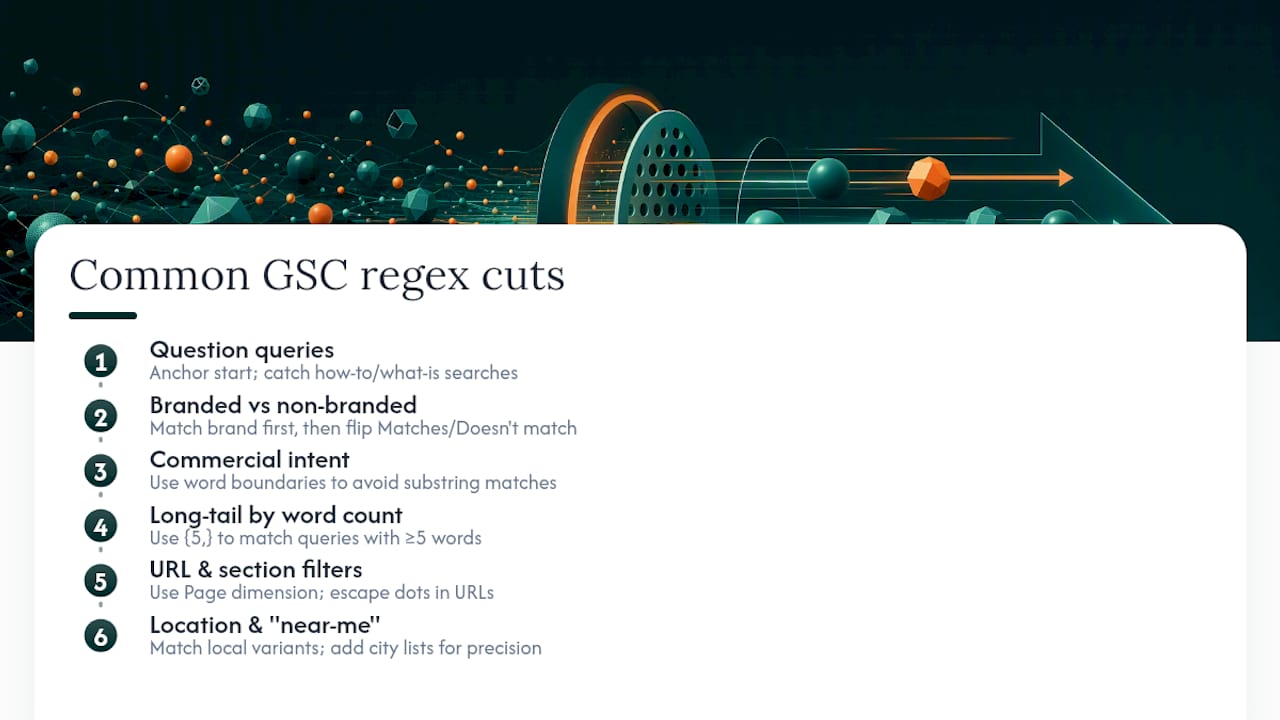
Question queries. To isolate how-to and what-is searches, anchor at the start of the string:
^(how to|what is|why does|can you)\s
This catches queries that begin with those phrases. Drop the ^ and you’ll also match “guide on how to fix,” which usually isn’t what you want.
Branded vs. non-branded traffic. Build a positive brand pattern first, something like \b(acme|acme app|acme inc)\b, run it under Matches regex to see branded volume, then flip the same filter to Doesn’t match regex to isolate everything else. That flip is the entire trick behind branded versus unbranded segmentation, and it works because RE2 has no negative lookahead to build the exclusion any other way.
Commercial intent. \b(buy|price|pricing|cost|discount|deal|coupon)\b picks up transactional queries. The word boundaries matter here: without \b, a query containing “discounted” would still match “discount,” but so would unrelated strings like “misdiscount” in edge cases. Boundaries keep the match honest.
Long-tail by word count. This is the pattern most people don’t know exists: ^(?:\S+\s+){4,}\S+$ matches any query with five or more words. Change the number inside the braces to tighten or loosen the cut. It’s a clean way to separate long-tail research queries from short head terms without manually counting words in a spreadsheet.
URL and section filters. For a blog subfolder, use ^/blog/ on the Page dimension. Escape literal dots when matching a domain or file extension, \.pdf$ rather than .pdf$, since an unescaped dot matches any character.
Location and near-me queries. \b(near me|in [a-z]+|nearby)\b catches most local-intent variants, though city names will need their own list if you want precision by market.
Pro Tip: Run every new pattern under both Matches and Doesn’t match before you trust either number. If the two counts don’t add up to your total query volume, your anchors or boundaries are off somewhere.
What RE2 Features Does GSC Support, and What Are Its Limits?
GSC’s regex filters run on RE2 syntax, the engine Google built for speed and predictability, not the PCRE flavor most SEOs learned on. RE2 gives you the constructs that matter for day-to-day filtering: anchors (^, $), alternation (|), word boundaries (\b), quantifiers ({n,}, +, *), and grouping with parentheses. These five tools cover the vast majority of useful patterns.
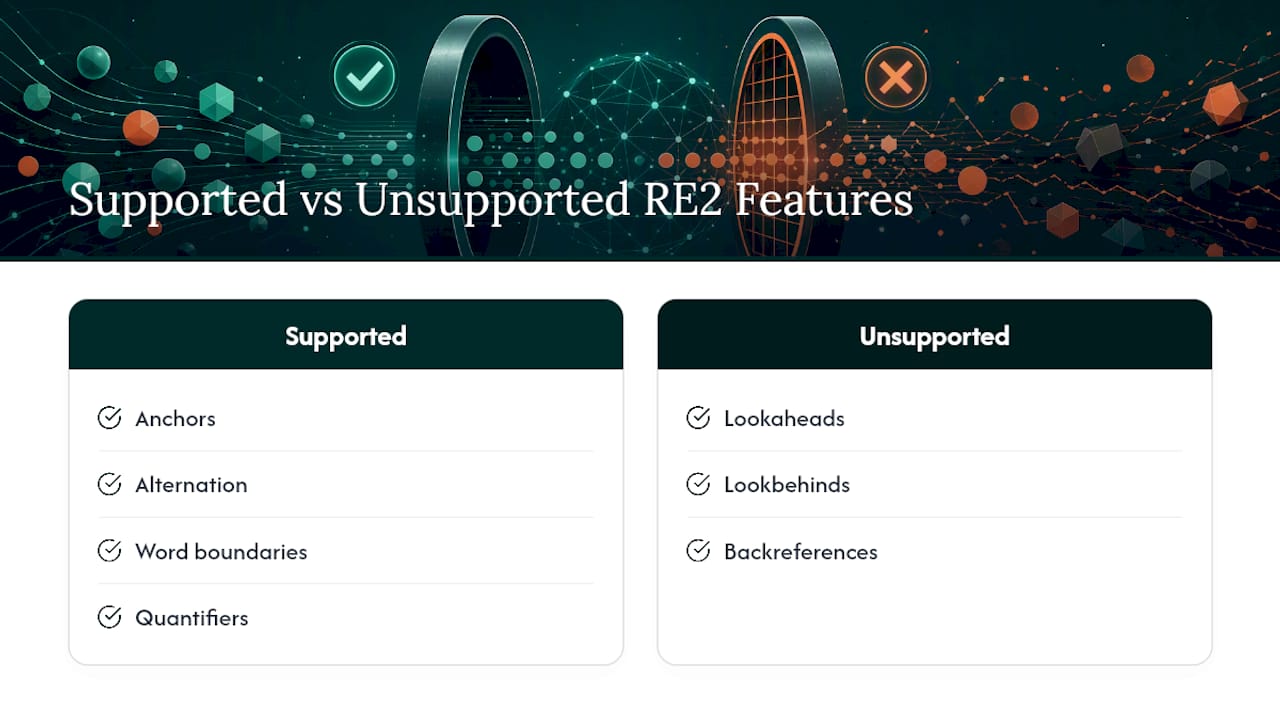
What RE2 refuses to run is just as important. Lookaheads, lookbehinds, and backreferences don’t exist in RE2, so a pattern like ^(?!brand).* will error out or simply return nothing. That’s why Google’s own guidance points you toward the Doesn’t match regex dropdown instead: build the positive pattern, then invert the filter mode rather than the regex itself.
Case handling splits by dimension. Queries are stored lowercase, so query patterns rarely need a case flag. Page URLs preserve their original casing, which means a pattern that works on one URL can miss another that differs only in capitalization. Add (?i) at the start of a Page pattern when you’re not certain of the casing.
Two operational ceilings matter at scale: patterns cap at 4,096 characters, and matching is partial by default unless you anchor it.
How Do You Apply Regex Filters in the GSC UI and API?
Setting up a regex filter takes five steps:
- Open Performance > Search results for the property you want to analyze.
- Click + New filter, then choose Query or Page.
- Select Custom (regex) from the match type list.
- Pick Matches regex or Doesn’t match regex, then paste your pattern.
- Click Apply and check the row count against your expected volume.
Before trusting the result, check your date range and any active Search Appearance filter. A pattern that returns zero rows for the last 7 days might return hundreds over 3 months, and a stray Search Appearance filter from an earlier session will silently narrow every query you run after it.
For anything past the 16-month data window or the 1,000-row visible cap, the UI stops being enough. The Search Console API accepts the same RE2 patterns inside dimensionFilterGroups, and it’s the only path to full row exports or cross-property comparisons. If you’re new to the Performance report’s structure generally, this overview of Search Console covers the dimensions and reports the API mirrors. Validate every pattern in an RE2-compatible tester first, confirm the total in GSC, then export.
Why Do My GSC Regex Filters Return Zero Rows or Too Many?
Zero rows, usually one of three causes:
- A lookahead or backreference snuck into the pattern; RE2 will reject it outright.
- The date range is too narrow for a low-volume query segment.
- On Page filters, a casing mismatch. Add
(?i)and rerun before rewriting anything.
Too many rows, usually a missing constraint:
- No anchors, so
^and$aren’t limiting the match to the full string. - No
\b, so a substring inside an unrelated word is matching. - An unescaped dot matching any character instead of a literal period.
For brand exclusion specifically, resist the urge to build one clever negative pattern. Use the positive brand pattern plus Doesn’t match regex, the same approach recommended above, since RE2 simply can’t run the lookahead version.
Pro Tip: Test every pattern in a Golang/RE2-mode regex tester before pasting it into GSC. The syntax highlighting in most browser-based testers defaults to PCRE, which will lie to you about whether your pattern is valid.
How Do You Scale Regex Filters Beyond the GSC UI?
Stacking filters gets you sharper segments than any single regex can. To find non-branded question traffic inside your blog, combine a question pattern on Query (Matches), a brand pattern on Query (Doesn’t match), and ^/blog/ on Page (Matches). Three filters, one clean cohort.
The 4,096-character cap shows up fastest with brand lists or large competitor-name OR chains. Split those into thematic filters, export each separately, and combine the results outside GSC rather than fighting for one gargantuan pattern. For recurring, high-volume segmentation, pull data through the API into BigQuery or a script that runs the same RE2-safe patterns iteratively across date ranges, preserving totals as you paginate.
When Should You Use Regex Instead of Native GSC Dimensions?
Regex is a workaround, not a first choice. When GSC exposes a structured dimension, Search Appearance or query type filters, use it; it’s more reliable than a regex proxy trying to approximate the same segment. Regex earns its place when no built-in dimension covers the cut you need: word count, section-level URL patterns, custom intent buckets. For scale or historical trend work past the 16-month window, I’d lean on the API paired with an external RE2-compatible workflow every time, rather than rebuilding the same filter in the UI month after month.
— Savannah
Scaling Regex Segmentation Without Doing It by Hand
The patterns above solve one-off analysis. The problem shows up when you need the same segmentation run weekly across a growing site, and manually rebuilding filters in the UI stops being realistic. Some platforms connect directly to Search Console data through analytics dashboards, so query and page segmentation feeds into the same workflow that publishes content.
That matters most once you’re past the row caps this article covered. Instead of exporting via the API and rebuilding RE2 passes in an external tool every time you need a fresh cut, Some services pull daily publishing and keyword research from the same underlying Search Console connection, so indexation gaps and content opportunities surface without a second regex workflow bolted on. If you want a read on where your own visibility gaps are, Ranksector’s GEO Audit gives you that starting point, and the Pro plan covers the full automated content and export workflow if you decide the manual regex route isn’t worth your week anymore.
Where to Verify RE2 Behavior and Test Your Own Patterns
- Search Console’s own filtering guide covers RE2 syntax, case rules, and the data window.
- Google’s blog post on regex negative match explains Matches vs. Doesn’t match with examples.
- SEO Stack’s pattern library and SEO Arcade’s regex reference go deeper on RE2-safe recipes and limits.
Sources
- Performance report (Search results): Advanced filtering and comparison - Search Console Help
- Search Console regex filters update and quick tips | Google Search Central Blog | Google for Developers
- Google Search Console & Regex Filters: The Ultimate Guide | SEO Stack Blog
- Google Search Console Regex: The Complete Library
FAQ
Is Regex Case-Sensitive in Google Search Console?
Query filters are effectively case-insensitive because GSC stores queries in lowercase. Page filters preserve original URL casing, so add (?i) at the start of a Page pattern when you’re unsure how a URL is capitalized.
Can I Use Lookaheads or Backreferences in GSC Regex Filters?
No. GSC runs RE2, which doesn’t support lookaheads, lookbehinds, or backreferences, so any pattern using (?!...) or \1 will fail. Build a positive pattern instead and apply it with the Doesn’t match regex option to get the same exclusion effect.
Why Are My GSC Rows Capped at 1,000?
The Performance report UI caps visible rows at roughly 1,000 even when the underlying totals are higher, and data only goes back about 16 months. For full exports past those limits, pull the same regex filters through the Search Console API.
Why Does My Regex Pattern Match More Than I Expected?
Matching is partial by default in RE2, so a pattern without anchors or word boundaries will catch substrings inside unrelated queries. Add ^ and $ to bound the full string, or \b around specific words, as recommended in RE2 pattern guides.
Does Ranksector Help With Search Console Data Beyond Manual Filtering?
Ranksector’s analytics dashboard integrates with Search Console data as part of its automated content and keyword research workflow, which reduces the need to rebuild regex exports by hand each week. Current pricing for the Pro plan is listed on Ranksector’s pricing page.