
A SaaS Content Calendar That Actually Ties to Pipeline
A minimal effective SaaS content calendar is a pipeline-aligned single source of truth: one place that schedules several channel-native posts per week and ties every piece to a funnel stage and an owner. If your calendar doesn’t do that, it’s a to-do list wearing a costume.
You don’t need a new tool to fix this today. You need three fields added to whatever you’re already using:
- Publish date — the actual day it goes live, not the day you started drafting
- Owner — one name, not “marketing team”
- Funnel stage — top, middle, or bottom, so you know what job the piece is doing
This article gives you the schema, the step-by-step build process, and starter templates (weekly, 90-day, annual) you can copy directly into Notion, Taskade, or a plain Google Sheet.
TL;DR:
- A SaaS content calendar needs fields for publish date, owner, and funnel stage to ensure clear accountability and goal alignment.
- Regular backlog audits, prioritization, and structured planning help prevent chaos and keep content aligned with product launches and SEO opportunities.
- Using simple tools like spreadsheets suffices for small teams, but larger teams benefit from dedicated content management platforms that support approvals and workflow.
- Repurposing content across channels should be mapped and assigned early, focusing on top-performing assets to maximize leverage without burnout.
- Automation can handle drafting and scheduling but must be guided by human oversight to maintain funnel relevance and product accuracy.
Table of Contents
- What Fields Does a SaaS Content Calendar Need?
- How Do You Build a Working Calendar From Scratch?
- What Cadence Templates Work for SaaS Teams?
- Should You Use a Spreadsheet, Notion, or a Calendar App?
- How Do You Turn One Piece Into a Full Channel Sequence?
- How Do You Measure and Review Calendar Performance?
- What Mistakes Should You Avoid Before You Hit Publish?
- What Do SaaS Teams Get Wrong About Automating Their Calendar?
- How Ranksector Fits Into Your Publishing Engine
- Key Takeaways
- Sources
What Fields Does a SaaS Content Calendar Need?
A calendar earns its keep when it answers three questions at a glance: what’s being published, who owns it, and what business goal it serves. Skip any of those and you’re back to a Slack thread pretending to be a plan.
The core schema every SaaS team should copy:
- Title — working headline or topic
- Publish date — the live date, tracked against your actual cadence
- Status — draft, in review, scheduled, published
- Owner — the single accountable person, even if others contribute
- Funnel stage — top (awareness), middle (consideration), bottom (decision)
- Primary CTA — the one action you want the reader to take
- Channel — blog, LinkedIn, email, in-app, etc.
- Product or feature tie — which release, feature, or use case it supports
Each column has a job. Status prevents the “wait, is this done?” Slack message. Funnel stage lets you audit whether you’re all-in on top-of-funnel awareness content while your demo requests stall out. Product tie is the field most teams skip and regret, because it’s what lets you connect a launch to a content spike instead of finding out three weeks later that nobody wrote about it.
Two optional fields pay for themselves once volume grows: a repurpose plan (what this becomes on other channels) and an approval owner (who signs off before it ships). If SEO is part of your mix, add a target keyword column too, so editorial and search intent aren’t managed in separate spreadsheets. A dedicated calendar built for SaaS teams exists specifically because scattered drafts, approvals, and launch dates create scheduling conflicts that a shared schema prevents.
How Do You Build a Working Calendar From Scratch?
Most teams don’t start with a blank calendar. They start with a graveyard of half-finished docs, an old spreadsheet, and a Notion page nobody’s opened since Q2. Building a real calendar means digging through that first.
- Audit the backlog. Pull every piece of content, drafted or published, into one list. Tag each by content pillar and funnel stage. Flag duplicates and near-duplicates for consolidation rather than letting three overlapping “what is X” posts compete against each other. A decision framework for consolidating overlapping articles is worth applying here before you add a single new row.
- Prioritize by business impact. Rank what’s left by three filters: does it align with an upcoming launch, does it respond to a real demand signal (support tickets, sales objections, search volume), and is there an SEO opportunity you’d otherwise leave on the table.
- Build the 90-day plan. Structure it around content pillars and funnel distribution, following the same logic a 90-day editorial plan built for SaaS teams uses: publish date, status, funnel stage, and owner as the backbone columns.
- Assign weekly narratives and slot channel drafts. Each week gets one core idea; every other post that week supports or adapts it.
- Assign owners and set a publishing checklist. No item goes on the calendar without a name attached and a defined “done” state.
Set your cadence based on actual capacity, not ambition. A solo marketer promising daily posts risks burnout early; a small focused team publishing a few times per week with real funnel alignment tends to perform better over time. Content marketing burnout is almost always a cadence problem disguised as a motivation problem.
Pro Tip: Run the backlog audit before you touch a new template. Populating a shiny calendar with the same unfocused content just gives your chaos a nicer coat of paint.
What Cadence Templates Work for SaaS Teams?
Different horizons need different templates. Trying to plan a quarter and a Tuesday in the same document is why most calendars collapse under their own weight.
The weekly narrative brief anchors daily work to one coherent idea. A workable structure, drawn from a weekly content calendar template built for SaaS, includes: audience, core message, proof point, primary CTA, and the angle to explicitly avoid so you don’t contradict last week’s message.
- 90-day editorial plan: organized by content pillar, funnel distribution across top/middle/bottom, named owners per pillar, and a review window every 30 days to catch drift early.
- Annual roadmap: mapped to product launches, seasonal buying patterns, and capacity planning, so Q4 doesn’t quietly become “whatever we have time for.”
- Cadence by company stage: early-stage teams do well with 2 to 3 posts weekly focused on category education; growth-stage teams can sustain 4 to 5 with dedicated funnel coverage; scale-stage teams often split cadence across product marketing and demand gen calendars rather than running one shared document.
Publishing more than your team can sustain doesn’t accelerate pipeline. It just accelerates burnout.
Should You Use a Spreadsheet, Notion, or a Calendar App?
The right tool is the simplest one that supports your schema without becoming its own project. A spreadsheet is genuinely enough for a team of one to three publishing a handful of posts weekly; you get sortable columns, no learning curve, and zero cost.
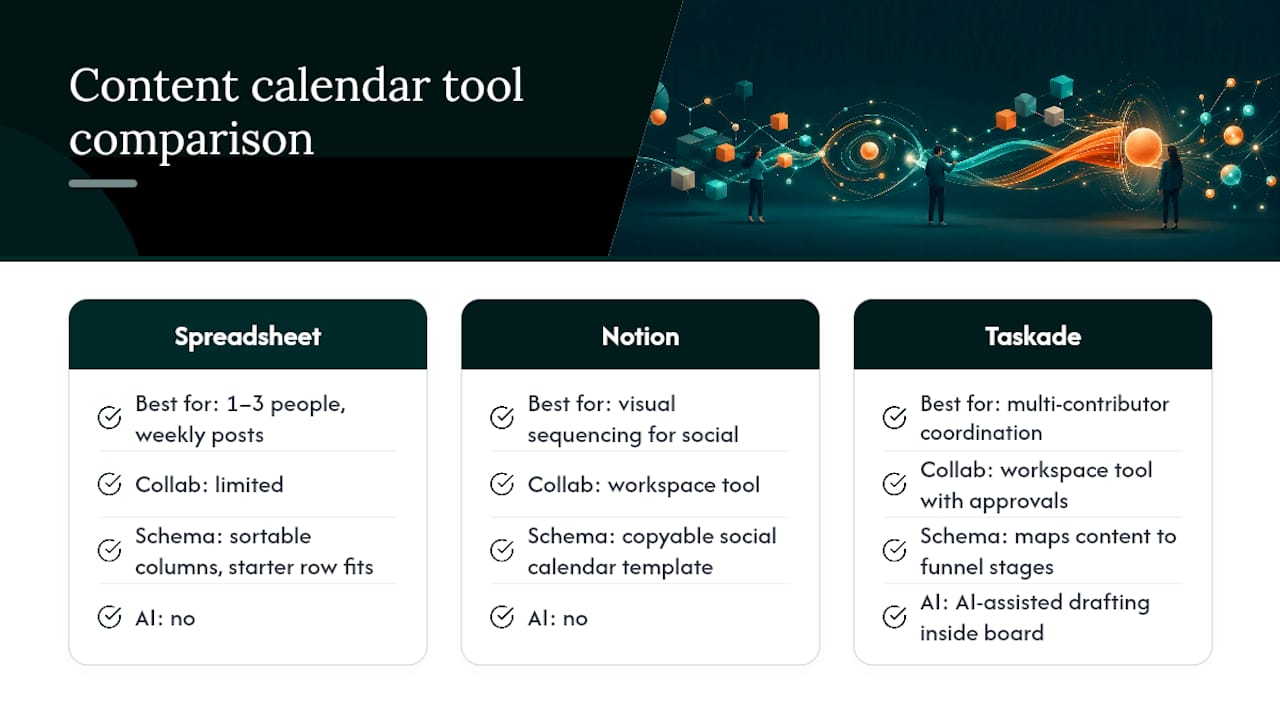
Once you’re coordinating multiple contributors, approvals, and channel-specific drafts, a workspace tool earns its keep. A B2B SaaS content calendar template built in Taskade maps content directly to funnel stages and supports AI-assisted drafting inside the same board. Notion offers a comparable copyable social calendar template for B2B SaaS if your primary need is visual sequencing across social channels. Integrated suites like CoSchedule go a step further, combining content and social scheduling with project visibility in one dashboard.
Whatever you pick, copy the same starter row structure every time: title, publish date, status, owner, funnel stage, CTA, channel, product tie. Connect it to Google Search Console early so organic performance data feeds back into the same system you plan from, rather than living in a separate report nobody checks.
How Do You Turn One Piece Into a Full Channel Sequence?
A single calendar entry should never mean a single output. The repurposing step is where most of the leverage in a content calendar actually lives, and it’s the step most teams skip under deadline pressure.
- Map outputs per channel before the piece is even drafted. One blog post might yield a LinkedIn sequence, two short-form social posts, and an email excerpt. A guide to turning one article into five LinkedIn posts is a useful reference for scoping that sequence without burning out the writer.
- Assign adaptation owners for each channel output, separate from the original writer if capacity requires it.
- Run the repurpose checklist: trim for length, rehook the opening line for the new platform, swap in native visual assets, and adjust the CTA to match the channel’s intent.
- Sequence the schedule: launch day, a follow-up push three to five days later, and evergreen re-promote windows every 60 to 90 days. Tools like Buffer or RecurPost handle the bulk scheduling and approval workflow once the sequence is mapped.
Repurpose your highest-performing assets first. A post that already converts is a better repurposing bet than an average one you’re hoping improves with a new format.
How Do You Measure and Review Calendar Performance?
Track each piece at 30 and 90 days: organic traffic, leads generated, demo requests attributed, and social engagement. At 30 days, decide whether to leave it alone, refresh the CTA, or repromote it. At 90 days, decide whether it earns a content refresh or gets retired and consolidated into a stronger piece.
Run a Friday learning loop every week: capture what performed, what didn’t, and why. Note whether an angle deserves a repeat run or a permanent retirement, then let that decision shape next week’s narrative brief. The weekly template from Privly builds this review directly into its structure rather than treating it as an afterthought.
- Organic traffic and rankings often take months to compound rather than days, so judge early content on leading indicators, not week-one traffic.
- Attribution for content marketing is rarely single-touch. Treat pipeline influence as directional, not gospel.
What Mistakes Should You Avoid Before You Hit Publish?
The same handful of errors sink most calendars: no funnel mapping (everything reads top-of-funnel), unclear ownership (three people think someone else is finishing it), inconsistent review cadence, and cadence promises nobody can sustain.
Before scheduling anything, run this checklist:
- CTA is specific and matches the funnel stage
- Internal links and product references are current
- Screenshots or visuals reflect the live product
- Owner has approved final copy
- Channel-native adaptation is drafted or scheduled
- Basic SEO elements (title, meta, target keyword) are in place
Push back on any calendar item that has no funnel stage, no owner, or no clear reason to exist beyond “we haven’t posted this week.”
What Do SaaS Teams Get Wrong About Automating Their Calendar?
Ranksector automates SEO-optimized article creation and daily publication for B2B SaaS teams, and that experience surfaces a pattern worth stating plainly: automation is excellent at eliminating the blank-page problem and terrible at deciding what your funnel actually needs next.

Draft generation, keyword research, and daily publishing cadence are exactly where automation accelerates a calendar. A tool can research competitors, draft a post, and schedule it faster than a team debating in Slack. What automation can’t do reliably is judge whether a piece genuinely supports a launch window, whether a claim in the draft matches your current pricing, or whether last month’s angle should be retired instead of repeated.
The workable split: let automation handle drafting volume and keyword targeting, and keep a human owner responsible for funnel alignment, product accuracy, and the final publish decision. Teams that skip that second half end up with a calendar that’s full but not aligned, which is its own kind of empty. A look at manual versus automated publishing workflows breaks down where that line typically sits in practice.
— Savannah
How Ranksector Fits Into Your Publishing Engine
If you’ve mapped a schema and a 90-day plan and now the problem is simply keeping up with it, that’s the exact gap Ranksector was built to close. Instead of a founder or lone marketer writing every post by hand, Ranksector runs daily SEO-optimized article drafts against your keyword targets and publishes them straight to your CMS, so the calendar you just built actually gets filled on schedule instead of sliding every week.
This fits small SaaS teams and lean marketing functions best: the people who know exactly what their funnel needs but don’t have five extra hours a week to draft, format, and publish it themselves. You still own the funnel mapping, the owner assignments, and the final review, but the drafting bottleneck disappears. Pair that with Ranksector’s backlink exchange system and you’re building domain authority on the same cadence you’re publishing content.
If your calendar has more empty rows than filled ones, start with the free tools to see how automated drafting slots into the schema you already built.
Key Takeaways
A SaaS content calendar works only when every entry carries a publish date, an owner, and a funnel stage tied back to a business outcome.
| Point | Details |
|---|---|
| Build the core schema first | Title, publish date, status, owner, funnel stage, CTA, channel, and product tie are non-negotiable columns. |
| Audit before you populate | Tag existing content by pillar and funnel stage, then consolidate duplicates before adding new items. |
| Plan at three horizons | Use a weekly narrative brief, a 90-day editorial plan, and an annual roadmap tied to launches. |
| Repurpose systematically | Map channel outputs, assign adaptation owners, and repurpose top performers first. |
| Review every Friday | Capture what worked in a short learning loop and let it shape the next week’s angle. |
| Automate drafting, not judgment | Ranksector handles daily article drafting and publishing while humans keep ownership of funnel alignment and accuracy. |
Sources
- Weekly SaaS Content Calendar Template | Privly
- Content Marketing Calendar Template - 90-Day Editorial Plan for SaaS | Desisle
- B2B SaaS Content Calendar Template | Taskade
- Content calendar software for SaaS teams | Liniest
Recommended
- Organic Traffic for SaaS: A Practical Playbook That Scales · Ranksector Blog · Ranksector
- AI Personalization for SaaS Audiences: A Practical Content Workflow · Ranksector Blog · Ranksector
- SEO Content Types for Small B2B SaaS Teams in 2026 · Ranksector Blog · Ranksector
- How to Repurpose One Article into 5 LinkedIn Posts Without Burning Out · Ranksector Blog — Ranksector