
Monitor Competitor Keyword Rankings: 2026 Guide
Monitoring competitor keyword rankings is the practice of systematically tracking where rival websites rank for keywords that drive revenue in your market. This monitor competitor keyword rankings guide covers everything from tool setup to prioritization tactics that separate reactive SEOs from those who consistently outrank their competition. Tools like Ahrefs, SEMrush, SpyFu, and SE Ranking make this process measurable and repeatable. The core principle is simple: when you know where competitors rank, you know exactly where to focus your content and link-building effort.
How to build a focused competitor keyword tracking setup
The first mistake most SEO professionals make is tracking too much. A standard setup involves 3 to 5 direct competitors and a focused list of revenue-driving keywords. Tracking 4 competitors across 25 keywords already generates 100 data points per check. Scale that to 200 keywords and you have a spreadsheet, not a strategy.

Start by pulling your top converting keywords from Google Search Console and your paid search campaigns. These are the keywords already proven to drive business. Prioritize them above everything else. Most sites have 30–40 critical keyword gaps versus their top competitors, so your list does not need to be exhaustive to be effective.
Choose your competitors deliberately. You need three types:
- The market leader: The site ranking for the most keywords in your category. Watching them shows you the ceiling.
- The fastest growing competitor: The site gaining the most new rankings month over month. They reveal what content formats and topics are working right now.
- Your closest sales rival: The company your prospects compare you to directly. Their keyword wins cost you deals.
Organize your keywords into tiers. Tier 1 covers your highest-revenue terms. Tier 2 covers supporting content that feeds Tier 1 pages. Tier 3 covers informational keywords worth monitoring but not worth losing sleep over. This structure keeps your weekly reviews focused on what actually moves the needle.
Pro Tip: Pull your paid search keywords into your organic tracking list. If you are paying for a keyword, you need to know whether a competitor is outranking you organically for the same term. That gap represents money you are leaving on the table.
What tools do you use to track competitor keyword rankings?
Setting up a project in Ahrefs, SEMrush, or SE Ranking follows a similar pattern across all three platforms. You create a project for your domain, add your target keywords, and then add competitor domains to the same project. The tool then pulls daily or weekly ranking data for every domain across every keyword you track.
The most valuable feature in any of these tools is the keyword gap report. Keyword gap tools filter for keywords where competitors rank in the top 20 but you rank beyond position 20 or do not appear at all. That filtered list is your content opportunity queue. Paid tools for this function run $69–$139 per month, and a content plan can be built from gap data in under 10 minutes.
Here is the core workflow for setting up competitor tracking in a rank tracking tool:
- Create a project for your primary domain and set your target location and device (desktop and mobile separately if your audience splits across both).
- Import your Tier 1 and Tier 2 keywords from Google Search Console or a CSV export from your keyword research tool.
- Add 3–5 competitor domains to the same project so the tool tracks their positions for your keyword list simultaneously.
- Run a keyword gap report to find terms competitors rank for that you do not. Filter by estimated traffic value, not raw search volume.
- Configure automated alerts for position changes that matter: drops greater than 5 positions on Tier 1 keywords and any competitor moving into the top 3 for a keyword you currently own.
The dashboard metrics worth reading daily are position deltas (how much a ranking moved), share of voice (what percentage of total clicks your domain captures versus competitors), and SERP feature capture (whether you or a competitor holds the featured snippet, People Also Ask box, or image pack for a given keyword).
| Metric | What it tells you | When to act |
|---|---|---|
| Position delta | How much a ranking moved since last check | Drop of 5+ on Tier 1 keywords |
| Share of voice | Your click share vs. competitors across tracked keywords | Declining trend over 2+ weeks |
| SERP feature capture | Who holds featured snippets and PAA boxes | Competitor gains a snippet you previously held |
| Keyword gap count | How many tracked terms competitors rank for that you do not | New gaps appearing after competitor content updates |
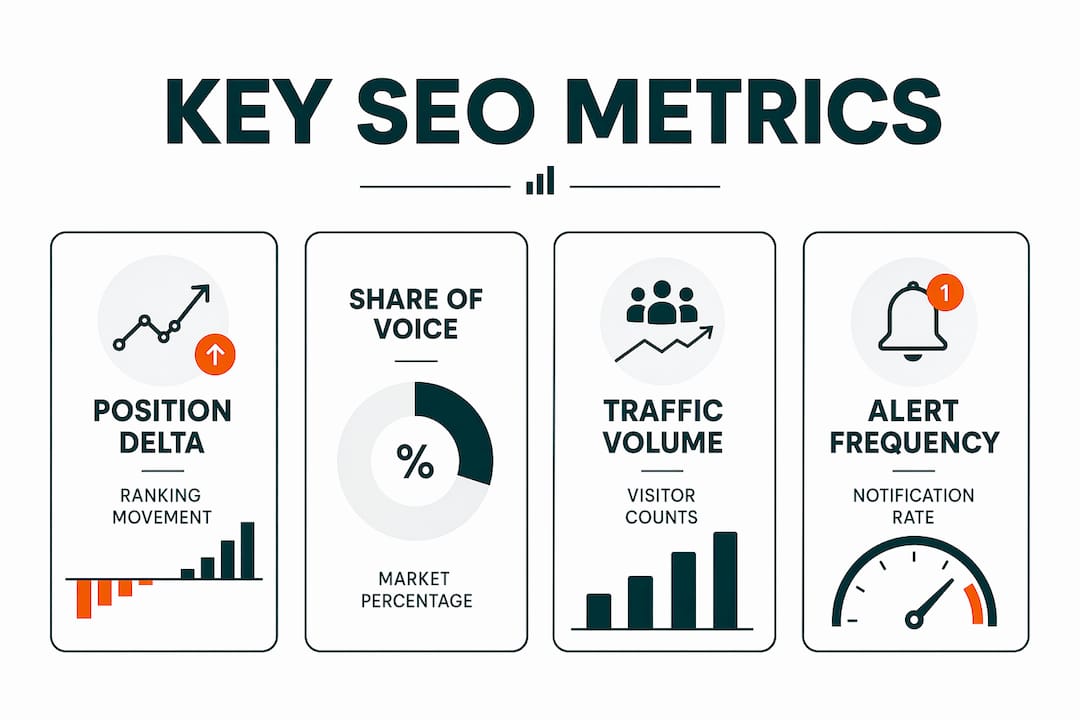
Alerts for competitor movements into top positions let you act immediately rather than discovering a threat weeks later during a manual review. Manual weekly checks are inefficient by comparison. Alert-driven workflows put the right information in front of you at the right time.
How to analyze competitor ranking data to maximize SEO ROI
Raw ranking data does not tell you where to spend your time. Prioritization does. Search volume alone is a misleading metric for deciding which competitor keywords to target. Click-through rates vary dramatically by position, meaning a keyword at position 1 can drive 10 times more traffic than the same keyword at position 5, even with identical search volume.
Opportunity scoring solves this problem. An opportunity score combines three inputs: search volume, keyword difficulty, and your current ranking position. A keyword with 2,000 monthly searches, moderate difficulty, and your site currently at position 8 scores higher than a keyword with 10,000 searches where you rank at position 45. The first keyword requires a small push. The second requires a major content investment.
When analyzing competitor data, focus on these signals:
- Position volatility: Keywords where competitor rankings fluctuate week over week indicate an unsettled SERP. These are easier to enter than stable SERPs dominated by authoritative pages.
- SERP feature changes: Losing a featured snippet impacts your traffic differently than dropping from position 3 to position 5. Track feature ownership separately from rank position.
- Competitor content updates: When a competitor jumps 10+ positions on a keyword, check their page. They likely updated content, added structured data, or earned new backlinks. That pattern tells you what Google is rewarding right now.
- Traffic value estimates: Tools like Ahrefs and SEMrush assign a dollar value to organic traffic based on what that traffic would cost in paid search. Use this metric to rank your gap keywords by business impact.
Pro Tip: When a competitor gains a featured snippet you previously held, do not just rewrite your content. Check whether they added a concise definition, a numbered list, or a table. Google rewards the format that best answers the query. Match the format, then outperform the content.
Opportunity scoring that factors in multiple data points drives more efficient SEO decisions than any single metric. Build a simple scoring model in a spreadsheet and re-rank your gap keywords monthly.
What mistakes should you avoid when monitoring competitor rankings?
The most common mistake in SEO competitor monitoring is confusing a competitor’s improvement with a problem on your own site. Position drops often reflect a competitor’s improvements rather than a technical failure or penalty on your end. Without competitor tracking, SEOs waste hours auditing their own site for issues that do not exist. Check competitor activity before you audit yourself.
A second mistake is tracking too many keywords without automation. If you cannot act on a ranking change within 48 hours, you are collecting data, not using it. Trim your tracked keyword list to what you can realistically respond to. For most teams, that means 50–100 Tier 1 and Tier 2 keywords per project.
Three more pitfalls to avoid:
- Chasing rankings without checking SERP features. A keyword where a competitor holds the featured snippet, the People Also Ask box, and the top organic result is not worth targeting with a blog post alone. You need a structured content strategy to displace that kind of SERP dominance.
- Ignoring AI visibility. Tracking how often competitors appear in AI-generated answers reveals a competitive layer that traditional rank tracking misses entirely. AI visibility is becoming a core metric in 2026 SEO strategies.
- Running manual checks instead of automated alerts. Alerts should trigger for position drops greater than 5 on Tier 1 keywords and for any competitor moving into the top 3 positions. Anything less urgent can wait for your weekly review.
“Competitor ranking monitoring is not just reactive. It is a proactive window into what content and backlink improvements are driving market shifts.” — How to Track Keyword Rankings
Setting up alerts correctly is the difference between a monitoring system that works for you and one you have to babysit. Configure your tool once, test the alerts with a known ranking change, and then trust the system.
Key Takeaways
Effective competitor keyword tracking requires a focused setup, alert-driven workflows, and opportunity scoring to turn data into decisions that improve rankings.
| Point | Details |
|---|---|
| Limit your competitor list | Track 3–5 direct competitors to keep data manageable and reviews focused. |
| Tier your keywords | Separate revenue keywords from supporting content to prioritize your response effort. |
| Use opportunity scoring | Combine volume, difficulty, and current rank to identify the highest-impact gaps. |
| Automate alerts | Set triggers for drops over 5 positions on Tier 1 keywords and competitor moves into top 3. |
| Track SERP features | Monitor featured snippet and PAA ownership separately from raw rank position. |
Why I stopped doing weekly manual rank checks
I spent two years running manual rank checks every Friday morning. I had a spreadsheet, a color-coding system, and a ritual that took about 90 minutes per client. It felt thorough. It was mostly theater.
The problem with manual checks is that you are always looking backward. By the time you notice a competitor jumped from position 8 to position 2 on a high-value keyword, they have already captured a week of traffic you will never recover. Alerts change that dynamic completely. The moment a competitor moves into the top 3 on a keyword I care about, I know. I can look at their page that day, not seven days later.
The second shift that changed my approach was moving from tracking keyword gaps by volume to tracking them by traffic value. A 500-search-per-month keyword worth $8 per click in paid search is more valuable than a 5,000-search keyword worth $0.40 per click. Once I reordered my gap list by estimated traffic value, my content priorities looked completely different.
The frontier I am watching closely is AI visibility. The role of AI in competitive intelligence is expanding fast. If a competitor’s brand appears consistently in ChatGPT and Perplexity answers for your category keywords, that is a competitive signal that no rank tracker currently captures well. The SEOs who build systems to monitor this now will have a real edge in 12 months.
My honest recommendation: spend less time in dashboards and more time acting on alerts. A 30-minute weekly review of alert-triggered changes beats a 90-minute manual audit every time.
— Savannah
Ranksector makes competitor tracking part of your content workflow
Competitor keyword monitoring only creates value when it connects directly to content production. Knowing a gap exists is not enough. You need to publish something that closes it.
Ranksector combines AI-powered keyword gap analysis with automated article publishing, so the gap you identify on monday becomes a published, SEO-optimized article by tuesday. The platform’s AI audit tool surfaces competitor keyword opportunities and maps them to content your site is missing. With over 11,000 articles already published for B2B SaaS teams, Ranksector is built for small teams that need consistent output without a full content department. You can start with the free SEO tools to run your first competitor gap analysis today.
FAQ
What is competitor keyword ranking monitoring?
Competitor keyword ranking monitoring is the practice of tracking where rival websites rank for keywords relevant to your business. It identifies gaps and threats so you can prioritize content and link-building decisions.
How many competitors should I track for keyword rankings?
Track 3 to 5 direct competitors. This generates enough data to spot patterns without creating analysis paralysis across hundreds of data points per check.
Which tools are best for tracking competitor keyword rankings?
Ahrefs, SEMrush, SpyFu, and SE Ranking are the most widely used tools. Each offers keyword gap reports, position tracking, and automated alerts for competitor movements.
How often should I check competitor keyword rankings?
Set automated alerts for immediate notification of significant changes. Run a deeper review weekly for Tier 1 keywords and monthly for Tier 2 and Tier 3 terms.
Why did my rankings drop even though I did not change anything?
A ranking drop without site changes usually means a competitor improved their content, earned new backlinks, or captured a SERP feature. Check competitor activity on that keyword before auditing your own page.
Recommended
- Find Untapped Keywords: Competitor Research Guide · Ranksector Blog — Ranksector
- How to Spot Keyword Cannibalization in Five Minutes · Ranksector Blog — Ranksector
- 6 Metrics That Predict Article Rankings in 2026 · Ranksector Blog — Ranksector
- Common Keyword Research Mistakes Businesses Make in 2026 · Ranksector Blog — Ranksector