
Copyable Zap Recipes and When to Go Managed for Zapier SEO Automation
Zapier automates the manual handoffs that eat up SEO work: keyword capture, report consolidation, AI draft routing, metadata generation, and CMS draft creation. The trade-off is that you have to design the review gates yourself, so unchecked AI output never publishes on its own. Connect Google Sheets, ChatGPT (OpenAI), Google Docs, and WordPress, and you have most of a working pipeline. If you’d rather skip the setup entirely, Ranksector runs that same research-to-publish loop as a managed service.
TL;DR:
- Most SEO automation with Zapier focuses on routine tasks like keyword enrichment, reporting, content routing, and technical alerts, saving significant time.
- To ensure safety, always set AI drafts to “Draft” status and build strict review gates before automating publishing or metadata updates.
- Multi-region SEO workflows should treat each language or locale as a separate Zap branch with tailored prompts and region-specific data storage.
- Backlink monitoring and outreach automation work best when logging prospects, scheduling reminders, and involving humans in message crafting, not fully automating outreach.
- Managed services like Ranksector offer turnkey solutions for small teams seeking complete, maintenance-free SEO automation and daily publishing at a fixed monthly cost.
Table of Contents
- Top SEO Automation Use Cases You Can Run With Zapier
- Concrete Zap Recipes for Keyword Research, Reporting, and Content
- How Do You Build a Keyword-Research Zap?
- What Guardrails Keep AI-Driven SEO Automation Safe?
- When Should You Use a Managed Platform Instead of Zapier?
- How Do You Handle Multi-Language or Multi-Region SEO Automation?
- Can You Automate Backlink Monitoring and Outreach?
- How Do You Automate Technical SEO Alerts and Site Audits?
- What SEO Tools Integrate Well With Zapier?
- Where Task Management Fits Into an SEO Automation Stack
- What Should You Automate First?
- Ranksector: A Hands-Free Publishing Option Worth Exploring
- Sources
- FAQ
Top SEO Automation Use Cases You Can Run With Zapier
Zapier’s SEO automation library covers keyword research, reporting, technical monitoring, link building, and content production by chaining triggers to actions across your existing tools. Here’s where the time savings actually show up:
- Keyword research pipelines: capture terms from a form or spreadsheet, enrich them with SERP data or an LLM call, and store them with priority tags automatically.
- SEO reporting: pull search analytics on a schedule, merge results into a master sheet, and distribute the summary without anyone copying and pasting.
- Content production: route an approved brief to an AI writer, land the draft in Google Docs, and assign a reviewer before it ever touches your CMS.
- Content QA: run automated checks for readability, metadata completeness, or accessibility gaps, then ping the reviewer only when something needs attention.
- Linking and outreach tracking: log new backlink prospects as they’re found and trigger follow-up reminders so nothing sits untouched for weeks.
None of this replaces judgment. It removes the parts of the job that never needed a human in the first place, so your team spends time on strategy and quality control instead of copying rows between tabs, which is exactly the case Zapier makes for automation freeing up content ops.
Concrete Zap Recipes for Keyword Research, Reporting, and Content
You don’t need to invent these from scratch. A handful of patterns cover most SEO workflows, and each one follows the same shape: trigger, enrichment, storage, notification.
- Keyword capture Zap. A form submission or webhook fires, an SERP or LLM step enriches the term with volume and intent signals, and the result appends to a Google Sheets or Airtable database.
- Reporting Zap. A scheduled trigger pulls search analytics data, merges it into a master sheet, and emails a view-only link to stakeholders instead of a raw export nobody reads.
- AI draft Zap. Once a topic gets approved, the Zap sends a structured prompt to an LLM, creates a Google Doc with the draft, and notifies the assigned reviewer that it’s ready.
- Review-gated publish Zap. On approval, the Zap creates a WordPress post with status set to “Draft,” never “Publish.” A human still decides when it goes live.
- Metadata and title generation Zap. Finalized keywords feed into an AI title generator, and the output updates the relevant CMS fields directly, cutting out the manual title-writing pass (Zapier’s keyword-to-title automation documents this exact flow).
Pro Tip: Build the review-gated publish Zap before any of the others. If your approval step isn’t airtight, every upstream automation you add just increases the volume of unchecked content waiting to go live.
How Do You Build a Keyword-Research Zap?
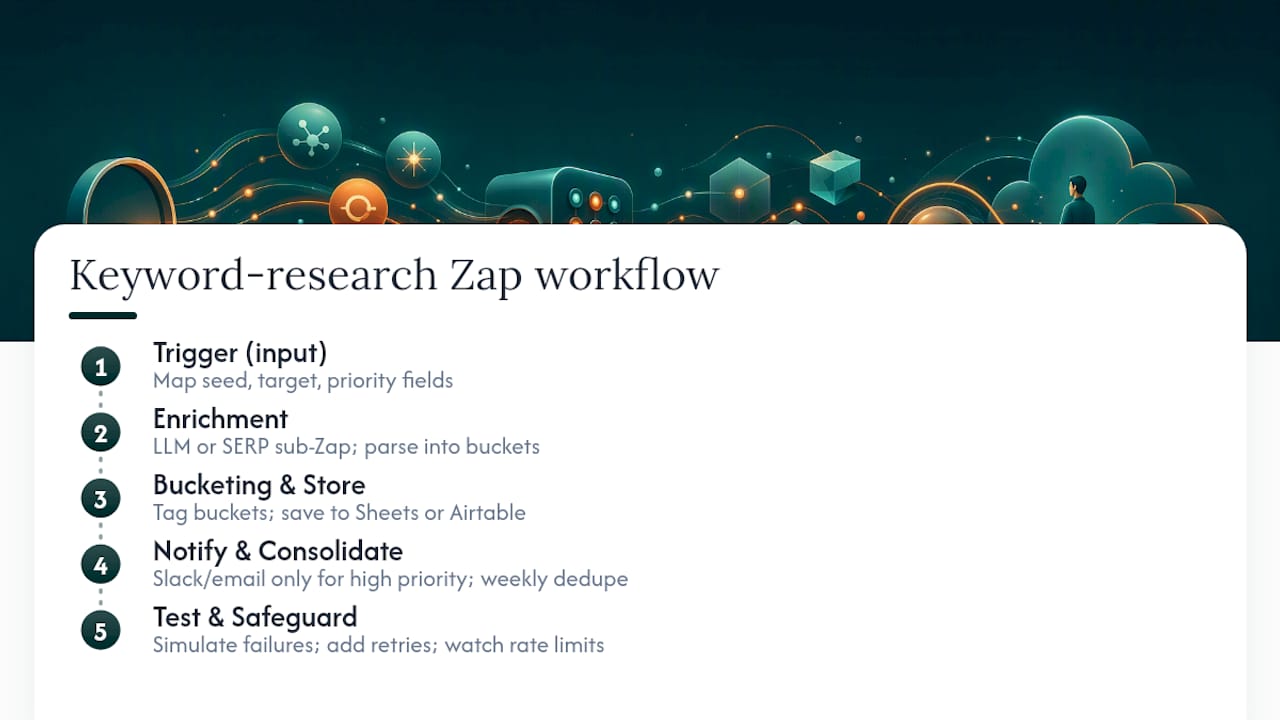
Start with the trigger. A Google Form, a new row in Google Sheets, or a webhook from your intake tool all work. Map each input field (seed term, target page, priority) so the rest of the Zap has clean data to work with.
Next, add enrichment. This is usually an LLM step, either through ChatGPT (OpenAI) or Google AI Studio (Gemini), or a sub-Zap that hits an SERP data source. Parse the output into three buckets: primary, secondary, and long-tail. This step is where most Zaps break if the prompt isn’t specific enough about the format you want back.
Store the structured results in Google Sheets or Airtable, tagged by bucket and flagged by priority. This becomes your single source of truth instead of five different spreadsheets floating around.
Add notifications next. A Slack or email alert should fire only for high-priority terms, not every single row. Then build a scheduled consolidation sub-Zap that runs weekly to catch duplicates and re-rank priority across the full list.
Finally, test failure paths on purpose. Submit a malformed input, disconnect an API key temporarily, and confirm the Zap fails safely rather than silently. Add retry logic where the platform supports it, and keep an eye on your LLM and SERP API rate limits before you scale the volume.
It’s far easier to catch a bad enrichment prompt on 20 rows than on 2,000.*
What Guardrails Keep AI-Driven SEO Automation Safe?
Every AI-generated draft should land in “Draft” or “Pending” status, never “Published.” This single rule, backed by guidance on human-in-the-loop review, does more to prevent embarrassing publishing mistakes than any other setting in your Zap.
Beyond the approval gate, a few operational habits matter:
- Log the prompt and source material used for each draft, so you can trace exactly what generated a given piece of content later.
- Watch your API usage against rate limits and expected per-call costs for LLM steps, and budget for them the same way you’d budget for a subscription tool.
- Set alerts for ranking drops, crawl errors, and content-quality regressions, not just for successful task completion.
- Sample a handful of published pages every week to check accuracy and search performance, rather than assuming the pipeline is working because nothing broke.
The reasoning behind the approval gate isn’t bureaucratic caution. It’s the difference between a pipeline that scales safely and one that quietly publishes a factual error to a hundred pages before anyone notices. Teams that succeed with this kind of automation tend to build small, testable Zaps first and expand only after measuring real impact, rather than automating an entire content operation in one pass.
When Should You Use a Managed Platform Instead of Zapier?
Ranksector runs a version of this pipeline as a full service: competitor-driven keyword research, AI-generated drafts, and daily publishing without you building a single Zap. The platform has published over 11,000 articles for B2B SaaS clients, with keyword targets set from competitor analysis rather than generic volume data.
The distinction is scope. Zapier is a toolkit for building bespoke pipelines out of the apps you already use. Ranksector is an end-to-end managed publishing solution that replaces the pipeline entirely. If your team is small and needs continuous daily content without dedicating an engineer to maintaining Zaps, a managed option usually wins on time saved. If you run a custom toolchain with specific integrations no platform will replicate, Zapier plus a stack like the one above still makes sense.
How Do You Handle Multi-Language or Multi-Region SEO Automation?
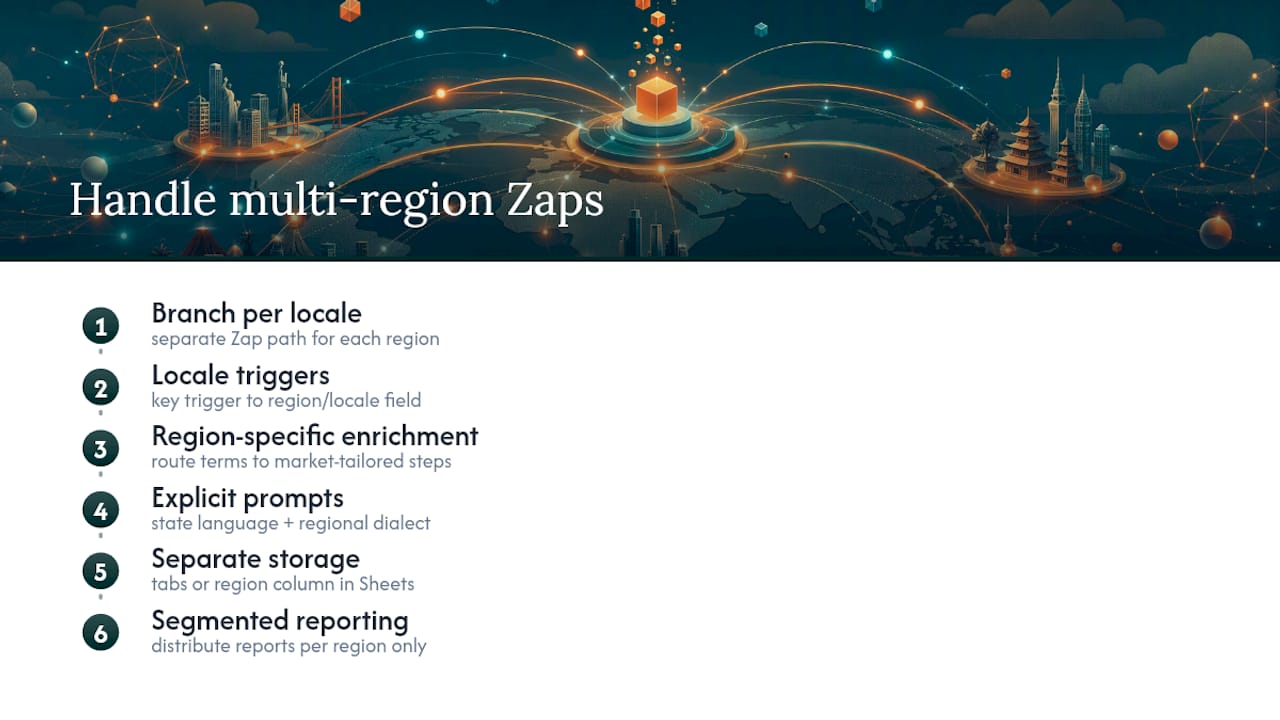
Multi-region SEO breaks most single-workflow setups fast, because keyword intent, search volume, and even competitor sets shift by locale. The fix is to treat each language or region as its own branch inside the Zap rather than trying to force one workflow to handle every market.
Set up separate trigger paths keyed to a region or locale field in your intake form or spreadsheet. A term submitted for the Spanish market should route to a different enrichment step than one submitted for the U.S. market, since search volume and phrasing rarely translate directly.
For AI draft generation, specify the target language and regional dialect explicitly in the prompt rather than relying on the LLM to infer it from context. A Google AI Studio (Gemini) or ChatGPT (OpenAI) call given clear instructions on regional spelling conventions, local terminology, and cultural references produces far fewer awkward translations than a generic prompt run through a translation layer afterward.
Store results in separate tabs or a region column inside your master Google Sheets, so reporting and reviewer assignment can filter by market without manual sorting. Assign regional reviewers who understand local search intent, not just fluent speakers, since a technically correct translation can still miss the actual query behind a keyword.
Finally, keep your reporting Zap segmented by region when you distribute results. A single consolidated report mixing five markets buries the signal reviewers actually need to act on.
Can You Automate Backlink Monitoring and Outreach?
Backlink tracking is one of the easier SEO tasks to automate because the workflow is mostly logging and reminders rather than judgment calls. A Zap can watch for new mentions or link opportunities, log them into a tracking sheet, and trigger a follow-up sequence automatically.
Set up a trigger that pulls new backlink data on a schedule, whether from an alert tool or a manual export process, and route it into a structured Google Sheets tab with columns for domain authority, contact status, and follow-up date. Add a scheduled Zap that scans for prospects sitting untouched past a set number of days and sends a Slack or email reminder to whoever owns outreach.
For outreach itself, automation works best for the logistics, not the message. Use a Zap to draft a personalized email template pulling in the target site’s name and relevant page, then route it to a human for a final read before sending. Fully automated cold outreach at scale tends to produce generic messages that get ignored, so the enrichment step matters more than the sending step.
Track response status in the same sheet that holds your prospect list, and trigger a notification when a reply comes in so the follow-up happens within hours instead of days. This closes the loop between “we found an opportunity” and “we did something about it,” which is where most backlink outreach efforts quietly stall.
How Do You Automate Technical SEO Alerts and Site Audits?
Technical SEO problems, broken links, missing meta tags, slow-loading pages, cost the most when nobody notices them for weeks. A Zap built around scheduled audit checks catches these faster than a monthly manual review ever will.
Set a trigger on a recurring schedule, daily or weekly depending on how fast your site changes, that pulls a crawl or audit report from your monitoring tool. Route flagged issues into a Google Sheets tracker tagged by severity, page URL, and issue type, so nothing gets lost in a raw export.
Add a filter step that separates critical issues (a 404 on a high-traffic page, a missing canonical tag) from minor ones (a slightly long title tag). Critical issues should trigger an immediate Slack or email alert to whoever owns the fix. Minor issues can wait for the weekly consolidation.
Build a second Zap that checks whether flagged issues have been resolved by the next crawl cycle, and close out the tracker row automatically when they are. This turns your audit tracker into a living log instead of a spreadsheet that only ever grows.
What SEO Tools Integrate Well With Zapier?
Zapier connects to most major SEO platforms, but the integration depth varies. Tools like Ahrefs, SEMrush, and Moz typically connect through webhooks, native app triggers, or exported data feeds rather than deep two-way syncs, so the practical pattern is usually one-directional: pull data out, don’t push complex configurations in.
A common setup pulls rank tracking or site audit data from your SEO tool on a schedule and routes it into the same Google Sheets tracker used for technical alerts and reporting, consolidating everything into one place instead of forcing your team to check three dashboards. Some platforms offer native Zapier triggers for new audit issues or ranking changes; others require a scheduled export step, so check your specific tool’s integration page before assuming full automation is available.
Where native triggers don’t exist, a scheduled Zap that checks an exported CSV or API endpoint on a set interval fills the gap reliably, even if it’s slightly less elegant than a live trigger.
Where Task Management Fits Into an SEO Automation Stack
Automation handles the data movement, but someone still has to own each task. Building task delegation into your Zaps prevents automated outputs from piling up unreviewed in a shared inbox.
When a keyword batch, draft, or audit issue gets created, route it to a task management tool (a Trello board, an Asana project, or even a tagged row in your tracking sheet) with an assigned owner and due date built into the automation itself. This turns a passive spreadsheet update into an actionable item someone is accountable for.
Add a status field that updates automatically as tasks move through review, so a manager can see progress without pinging the team for updates. A weekly summary Zap that reports how many items are pending, in review, or completed gives you a lightweight dashboard without building anything custom.
What Should You Automate First?
Automate intake, reporting, and routing first. These carry the least risk because they move data, not judgment. Keep strategy decisions and the final publish click human, always. A sane rollout looks like 30 days piloting one Zap, 60 days adding review gates and measuring results, 90 days scaling what worked. Skip the audit trail and final approval step, and you’re one bad prompt away from publishing something you’ll regret.
— Savannah
Ranksector: A Hands-Free Publishing Option Worth Exploring
Building the Zaps above gets you real automation, but it still takes setup time, maintenance, and someone watching for broken triggers. Ranksector runs the same research to draft to publish loop as a managed service, with competitor-driven keyword research and daily publishing built in from the start.
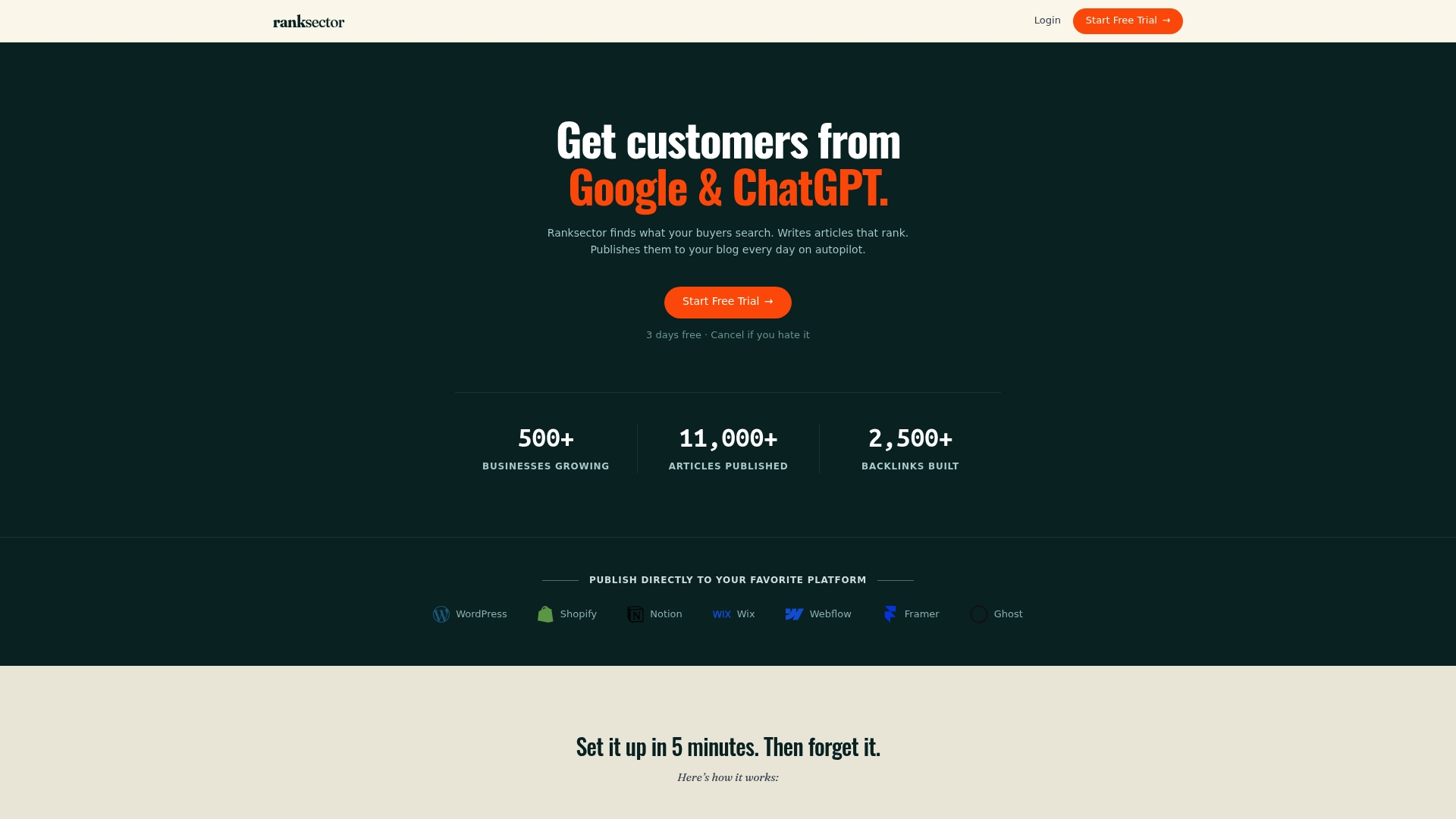
That matters most for small teams without an engineer to spare on Zap maintenance. Ranksector’s Pro plan runs $99 per month and covers the full pipeline: keyword research, AI-generated drafts, and daily publishing to your CMS. If you want a diagnostic first, the GEO Audit gives you a read on how your site currently shows up across AI and search visibility before you commit to a workflow change. Setup takes minutes rather than the days you’d spend wiring a custom Zapier stack, and there are no additional per-link or per-article fees beyond the subscription. If you’re already comparing automation routes, it’s worth putting Ranksector’s managed approach next to whatever custom pipeline you were about to build.
Sources
- SEO Automations & AI Workflows | Zapier
- How to set up human-in-the-loop review for AI-generated content
- Create consolidated search insights spreadsheet and email team | Zapier
FAQ
Is SEO Dead Now With AI?
No. AI has changed how content gets produced and how search results get generated, but ranking fundamentals like relevance, structure, and backlinks still apply. Automation tools, including Zapier’s SEO workflows, are built specifically to help teams keep pace with that shift rather than replace SEO strategy.
What Is the Best Automated SEO Tool?
It depends on whether you want to build custom pipelines or want a managed solution. Zapier is the strongest option for teams that want to connect specific existing tools into a custom workflow, while a platform like Ranksector fits teams that want research, drafting, and daily publishing handled end to end.
Is There Anything Better Than Zapier?
For general app-to-app automation, Zapier remains one of the most widely integrated platforms available, connecting to thousands of tools including Google Sheets, ChatGPT, and WordPress. For SEO publishing specifically, a managed platform like Ranksector can outperform a DIY Zapier stack on speed to launch, since it skips the build and maintenance work entirely.
What Is the Best SEO Tool in 2026?
There’s no single best tool since the right choice depends on whether you need research, technical audits, or content publishing. For automated content production and daily publishing without in-house engineering, Ranksector is built specifically for that gap, while tools like Ahrefs, SEMrush, and Moz remain strong for research and technical auditing when paired with an automation layer.