
How Google Crawls New Websites: 2026 Guide
Google crawling is defined as the automated process by which Googlebot discovers, fetches, renders, and evaluates web pages for potential inclusion in Google Search. Understanding how Google crawls new websites is the foundation of every effective SEO strategy. Googlebot operates through a multi-step pipeline: it finds URLs, fetches their content within strict technical limits, renders the page, and then passes it to the indexing system for a quality decision. Get any step wrong and your pages stay invisible, no matter how good your content is.
How google crawls new websites: the discovery process
Google discovers new content primarily through internal and external links, XML sitemaps, and manual URL submissions via Google Search Console. Internal linking is the most reliable and efficient discovery method. Think of it as building a road network inside your site. Every new page you publish needs at least one internal link pointing to it from an already-indexed page, or Googlebot may never find it.
The four main discovery pathways work like this:
- Internal links: A link from an existing indexed page to a new page is the fastest way to get Googlebot’s attention. The stronger the linking page, the faster the discovery.
- External links: When a third-party site links to your new page, Googlebot finds it during its regular crawl of that site. This is why early backlinks matter for brand-new domains.
- XML sitemaps: Submitting a sitemap through Google Search Console signals which URLs exist on your site. Sitemaps are hints, not commands. Google prefers link-based discovery and uses sitemaps mainly to surface orphan pages that lack inbound links.
- Manual URL submission: The URL Inspection tool in Google Search Console lets you request crawling of a specific URL. Manual submissions are a precision tool, not suited for bulk discovery, and best reserved for urgent content updates.
Pro Tip: When you publish a new page, immediately add an internal link to it from your homepage or a high-traffic category page. This single action cuts discovery time more reliably than any sitemap submission.
How does googlebot crawl and render pages?

After Googlebot adds a URL to its crawl queue, it fetches the page content. Googlebot limits its fetch to the first 2MB of any URL’s HTML content. Any content beyond that limit is not fetched, rendered, or indexed. For most standard pages this is not a concern, but for long single-page applications or content-heavy pages, it means your most important content must appear early in the HTML source.
After fetching, Googlebot passes the page to Google’s Web Rendering Service. This service processes HTML, CSS, and JavaScript to build a full picture of what the page looks like. The catch is that rendering JavaScript content may be deferred due to resource intensity. This can create a gap of hours or even days between when a page is crawled and when its JavaScript-rendered content is fully indexed.
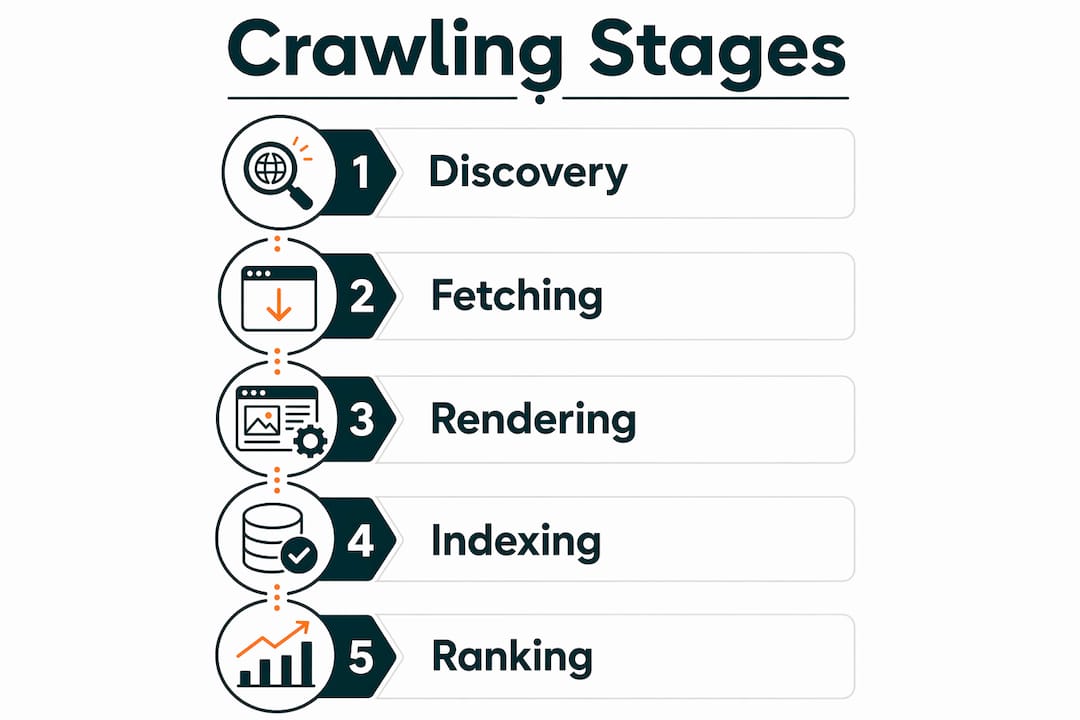
| Crawl Stage | What Happens | SEO Implication |
|---|---|---|
| Fetch | Googlebot downloads up to 2MB of HTML | Key content must appear early in HTML |
| Render | Web Rendering Service processes JS/CSS | JS-heavy pages may face indexing delays |
| Queue | Rendered page enters indexing pipeline | Quality evaluation determines inclusion |
| Index | Page stored and ranked in search results | Only quality content gets indexed |
Googlebot now primarily crawls with a mobile user agent. Mobile site content is the primary source for indexing. If your mobile version hides content behind tabs or loads it only via JavaScript, that content may not make it into the index at all.
Pro Tip: Test your pages with Google Search Console’s URL Inspection tool and click “View Crawled Page.” This shows you exactly what Googlebot saw, including whether JavaScript content was rendered correctly.
What factors determine whether a crawled page gets indexed?
Crawling and indexing are two separate decisions. Indexing is an editorial decision made after crawling and rendering, where Google evaluates content quality before including it in search results. A page can be crawled dozens of times and never indexed if it fails Google’s quality filters.
The most common quality signals Google evaluates include:
- Uniqueness: Duplicate or near-duplicate content across your own site or the wider web signals low value. Google indexes the version it considers canonical.
- Content depth: Thin pages with little original information rarely pass the quality bar. A 200-word page covering a topic that competing pages cover in 1,500 words will likely be skipped.
- Technical health: Slow load times, broken internal links, and poor Core Web Vitals scores all reduce the likelihood of indexing.
- Internal linking signals: Pages with strong internal link equity are treated as more important. A page with zero internal links pointing to it looks like an orphan.
The “Crawled but not indexed” status in Google Search Console is the clearest signal of a quality failure. It means Googlebot visited the page but decided it was not worth adding to the index. The fix is almost always content quality, not a technical crawl issue.
Google’s indexing pipeline uses an incremental near-real-time system called Percolator for rapid index updates after crawling. This dramatically reduces document age in search results compared to older batch indexing methods. Fresh, high-quality content can appear in search results within hours of being crawled.
How does crawl budget work for new websites?
Crawl budget is the number of URLs Googlebot will crawl on your site within a given timeframe. Crawl budget constraints mostly impact very large sites with thousands of pages. For a new or small website, crawl budget is rarely a limiting factor. Your energy is better spent on internal linking and content quality.
| Site Type | Crawl Budget Priority | Primary Focus |
|---|---|---|
| New site (under 100 pages) | Low concern | Internal linking, content quality |
| Growing site (100–1,000 pages) | Moderate concern | Sitemap hygiene, no crawl waste |
| Large site (1,000+ pages) | High concern | Crawl budget optimization, log analysis |
Googlebot controls crawl rate to avoid overloading servers and may reduce crawl frequency if server response is slow or errors occur. Maintaining fast server response times directly maximizes how many pages Googlebot can process per visit. A server that returns 500 errors or times out trains Googlebot to visit less often.
For new websites, the practical optimization checklist looks like this:
- Build a clean internal linking structure from day one. Every page should be reachable within three clicks from the homepage.
- Submit an XML sitemap in Google Search Console and keep it updated as you publish new content.
- Avoid wasting crawl capacity on low-value URLs like tag pages, filtered URLs, or duplicate parameter variations. Use robots.txt or canonical tags to manage these.
- Monitor your site’s crawl health regularly to catch server errors before they compound.
How to speed up google crawling and indexing of new pages
Speed matters most in the first weeks after launch. These steps give Googlebot the clearest possible signal to crawl and index your new pages quickly.
- Submit your sitemap in Google Search Console. Go to Search Console, navigate to Sitemaps, and submit your XML sitemap URL. Google will begin processing it within hours.
- Use the URL Inspection tool for priority pages. For your homepage, key service pages, or freshly updated content, request indexing directly. Reducing crawl-to-index time from weeks to under 24 hours is possible with manual submission for critical pages.
- Build internal links from high-authority pages. Link to new content from your most-visited pages. A link from your homepage carries more weight than ten links from obscure archive pages.
- Avoid accidental blocking. Check your robots.txt file and confirm it does not block Googlebot from your key pages. Verify that no important pages carry a
noindexmeta tag by mistake. This is a more common launch error than most people realize. - Improve page speed. Faster server response means Googlebot can crawl more pages per session. Use tools like Google PageSpeed Insights to identify and fix performance issues before launch.
- Earn early backlinks. A single link from an established, indexed site can trigger Googlebot to discover and crawl your new pages within days. Reach out to partners, suppliers, or industry directories for early placements.
The internal linking structure you build in the first weeks of a site’s life has a compounding effect. Pages that get linked early get crawled more often, indexed faster, and tend to accumulate ranking signals more quickly than pages added later without links.
Key takeaways
Google crawls new websites through a four-stage pipeline of discovery, fetching, rendering, and indexing, and internal linking is the single most controllable factor in how fast and how deeply that process reaches your content.
| Point | Details |
|---|---|
| Discovery pathways | Internal links, external links, XML sitemaps, and manual Search Console submissions all feed Googlebot new URLs. |
| Fetch limit matters | Googlebot fetches only the first 2MB of HTML, so critical content must appear early in the page source. |
| Crawling does not equal indexing | A crawled page still faces a quality evaluation; thin or duplicate content will be skipped. |
| Mobile-first is non-negotiable | Googlebot indexes from the mobile version of your site, so mobile content gaps become index gaps. |
| Crawl budget is rarely the issue | New and small sites should focus on content quality and internal linking, not crawl budget management. |
What i’ve learned about crawling that most guides get wrong
Most new website owners spend their first weeks obsessing over crawl budget and sitemap submissions. I understand the instinct. These feel like levers you can pull. The reality is that Google’s crawl infrastructure is sophisticated enough that, for any site under a few hundred pages, crawl budget is essentially a non-issue.
What actually moves the needle is internal linking. I’ve seen sites with perfect sitemaps and zero internal link structure sit unindexed for months. I’ve also seen sites with no sitemap at all get indexed within 48 hours because they had strong internal links and a few early backlinks from relevant domains. The sitemap is a fallback. Internal links are the primary signal.
The other thing most guides underplay is the rendering gap. If you’re building on a JavaScript-heavy framework like Next.js or Nuxt, you need to think carefully about server-side rendering or static generation. Google’s Web Rendering Service will eventually process your JavaScript, but “eventually” can mean days. For a new site trying to build momentum, that delay is costly. Prioritize HTML-first content delivery wherever you can.
My honest advice: spend 80% of your crawl optimization effort on content quality and internal linking. Spend the remaining 20% on sitemaps, Search Console monitoring, and page speed. The rest is noise.
— Savannah
Get your new website indexed faster with Ranksector
Getting Googlebot to find, crawl, and index your pages is only half the challenge. The other half is publishing enough high-quality content consistently to give Googlebot a reason to keep coming back.
Ranksector automates the creation and publication of SEO-optimized articles for B2B SaaS companies and growing websites. With over 11,000 articles already published and a built-in backlink exchange system, Ranksector helps new sites build the content depth and domain authority that Google rewards with faster, deeper crawling. You can explore the free SEO tools to audit your site’s crawl health, or run a full AI-powered site audit to identify exactly where your indexing pipeline is breaking down.
FAQ
How long does it take google to crawl a new website?
Google can discover and crawl a new website within a few days if it has inbound links from indexed sites or a submitted sitemap. Without either, discovery may take weeks.
What is the difference between crawling vs indexing?
Crawling is the process of Googlebot fetching and rendering a page. Indexing is the separate editorial decision to include that page in search results based on content quality.
Does submitting a sitemap guarantee google will index my pages?
No. Sitemaps are hints for discovery, not guarantees of indexing. Google still evaluates each page for quality before adding it to the index.
Why is my page crawled but not indexed?
“Crawled but not indexed” means Google visited the page but judged it below its quality threshold. The most common causes are thin content, duplicate content, or weak internal linking signals.
How does mobile-first indexing affect new websites?
Googlebot primarily crawls using a mobile user agent, so any content missing from your mobile version will also be missing from Google’s index.
Recommended
- How to Spot AI-Generated Content Google May Penalize · Ranksector Blog — Ranksector
- ChatGPT vs Google Search: How the Same Query Gets Interpreted Differently · Ranksector Blog — Ranksector
- How to Spot Keyword Cannibalization in Five Minutes · Ranksector Blog — Ranksector
- What AI Search Engines Look for When Choosing Citations · Ranksector Blog — Ranksector